Who Should Read This Guide
If you’re a Malaysian retail investor trading on M+ Global through Malacca Securities, understanding order types is essential. Whether you’re placing your first trade or refining your strategy, this guide walks you through each order type, how to use it, and when it makes sense for your portfolio.
How to Choose Your Order Type
Selecting the right order type is one of the first decisions you’ll make when placing a trade. Here’s how to access it:
- Open the individual stock details page
- Tap Trade
- Select Buy or Sell
- Choose your Order Type
- Set up the order type according to your preference
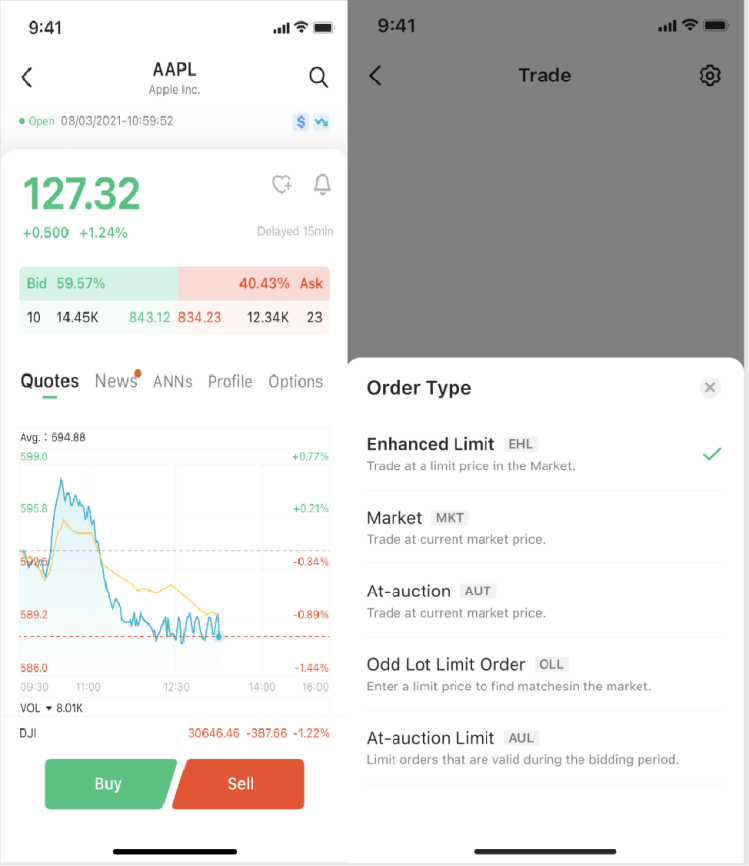
Order Types for Hong Kong and US Stocks
1. Limit Order
A limit order is an order visible to the market where you specify exactly the price at which you’re willing to buy or sell. This gives you full control over your entry and exit prices.
How it works:
- When buying, your bid price cannot be higher than the lowest asking price on the market
- When selling, your asking price cannot be lower than the highest bid price on the market
- Your order joins a price queue at your specified price level
- During Continuous Trading Sessions, the system only accepts limit orders
Remisier tip: Limit orders give you certainty about price, but there’s no guarantee your order will fill if the market moves away from your specified price. Use them when you have a specific target price in mind and patience to wait.
2. Market Order
A market order lets you buy or sell immediately at the current market price without specifying a price. It prioritizes speed and execution over price precision.
Important things to know about market orders:
- Your order may be split into multiple smaller orders for execution
- Each smaller order may fill at a different price
- If there aren’t enough sellers (or buyers) in the order book, your market order may only partially fill, and the unfilled portion will be automatically cancelled and marked as “Cancelled”
- In stocks with low liquidity, your order may not fill at all and will be automatically cancelled
- During rapid market moves, you have no guarantee of a better execution price—you may get a higher or lower price than expected
- Price deviations are more likely right after market opens (Morning or Afternoon Session), when the system processes accumulated orders
- For risk control, M+ Global temporarily calculates your market order value as current price × market order multiplier, which reduces your available buying power. This frozen amount is released once your order fills or is cancelled
Remisier tip: Market orders are best for high-volume, liquid stocks where you need instant execution. Avoid them for illiquid or thinly-traded stocks, and be cautious at market open when prices can be volatile.
3. At-Auction Order
An at-auction order is accepted only during the Pre-opening Session or Closing Auction Session (the auction call periods). You specify the quantity to buy or sell, but not the price—instead, your order matches at the final Indicative Equilibrium Price (IEP).
Key features:
- No price is specified by you
- At-auction orders have higher matching priority than at-auction limit orders
- Orders are matched in time priority (first in, first out) at the final IEP
- Any outstanding at-auction orders after the Pre-opening Session ends are automatically cancelled before Continuous Trading begins
4. At-Auction Limit Order
An at-auction limit order combines elements of both limit and auction orders. You specify a price, and the order is only matched during the Pre-opening or Closing Auction if certain conditions are met.
How it works:
- For a buy order: your specified price must be equal to or higher than the final IEP
- For a sell order: your specified price must be equal to or lower than the final IEP
- Orders are matched in price and time priority at the final IEP
- Your order will never match at a price lower than the final IEP (for buys) or higher than the final IEP (for sells)
Carry-forward to Continuous Trading: If your at-auction limit order is not filled by the end of the Pre-opening Session, it may automatically carry forward to the Continuous Trading Session—but only if your specified price does not deviate 9 times or more from the nominal price and is 1/9 or less of the nominal price. When carried forward, your order joins the price queue at your input price.
Remisier tip: At-auction limit orders are useful for targeting stocks at opening or closing prices while maintaining price discipline. However, remember they won’t carry forward if your price is too far from the nominal price.
Learn more about order types
- Market Order vs Limit Order on Bursa Malaysia
- Day Orders vs GTC: Time-in-Force for Malaysian Traders
- Stop Order vs Stop-Limit Order: When to Use Each
- Market-If-Touched vs Limit-If-Touched Orders Explained
- Trailing Stop Orders Explained for Malaysia Stock Traders
- Bursa Malaysia Tick Size: How Minimum Bid Works
- Bursa Price Limits: How Limit Up and Limit Down Work
Key Takeaways
- Limit orders give you price control but no execution guarantee; use them for precise entry/exit targeting
- Market orders prioritize speed but may execute at multiple prices or not fill at all in low-liquidity stocks
- At-auction orders are only available during Pre-opening and Closing Auction sessions and match at the IEP
- At-auction limit orders can potentially carry forward to Continuous Trading if price conditions are met
- Market orders temporarily freeze buying power based on a market order multiplier to manage risk
- Choose your order type based on liquidity, volatility, and whether you prioritize price certainty or execution speed
Frequently Asked Questions
What’s the difference between a limit order and a market order?
A limit order lets you specify the exact price you’re willing to buy or sell, giving you price certainty but no guarantee of execution. A market order executes immediately at the current market price, prioritizing speed over price control. If there isn’t enough liquidity, a market order may only partially fill or be cancelled entirely.
When should I use an at-auction order instead of a regular limit order?
At-auction orders are available only during Pre-opening and Closing Auction sessions and match at the final IEP. Use them if you want to enter or exit during these specific periods without guessing the exact opening or closing price. Regular limit orders work throughout the Continuous Trading Session.
Can my at-auction limit order move to Continuous Trading?
Yes, outstanding at-auction limit orders can automatically carry forward to Continuous Trading after the Pre-opening Session—but only if your specified price does not deviate 9 times or more from the nominal price and is 1/9 or less of the nominal price. When carried forward, your order joins the price queue at your input price.
Why might my market order not fill completely?
Market orders may only partially fill if there aren’t enough buyers or sellers at the current price level, or if the stock has low liquidity. Any unfilled portion is automatically cancelled and marked as “Cancelled” status. In low-liquidity stocks, your entire market order may be cancelled if there are no matching orders in the order book.
What happens to my buying power when I place a market order?
M+ Global temporarily freezes an amount of your buying power to manage risk. This frozen amount is calculated as the current price multiplied by the market order multiplier (which adjusts based on market conditions). Once your order fills or is cancelled, the frozen buying power is released back to your account.
More M+ Global guides
Open your M+ Global account with Dexter Chia
Sign up in the M+ Global app with Invitation Code UBZQ to get AI automated tools, AI stock analysis and AI alerts — and a remisier you can actually reach.
WhatsApp: +60169059789 | Why choose Dexter?
Source: based on the official M+ Global Help Centre (Malacca Securities Sdn Bhd). Fees, hours and procedures are set by Malacca Securities and the exchanges and may change — check the M+ Global app or ask your remisier for the latest.
Disclaimer: This guide is for general information only and is not financial advice.