Who This Guide Is For
If you’re a Malaysian retail investor ready to explore international markets—whether you want to trade U.S. stocks, Hong Kong shares, or Malaysian securities—this guide will walk you through opening your first M+ Global account. You don’t need investing experience; we’ll explain each step in plain language.
Understanding Your Account Options
Before you start the opening process, it’s important to choose the right account type for your needs. M+ Global offers three distinct options:
1. Cash Account
A cash account works like a debit card for stock trading. You can only invest the money that’s actually in your account, and all purchases must be fully paid on the designated settlement dates. This account type is straightforward and has no borrowing costs, making it ideal for conservative investors or those just starting out. It’s not classified as a restricted account for securities trading.
2. Margin Account (U.S. and Hong Kong Markets)
A margin account gives you more firepower by allowing you to borrow funds from Malacca Securities, secured by the securities you hold. This flexibility means you can take larger positions, but it comes with interest costs and a risk element: if your account’s risk level hits a certain threshold, the company has the right to automatically sell your securities (called a margin call). Unlike a cash account, margin accounts don’t have a strict settlement deadline until you receive a margin call.
3. Collateral Trading Account (Malaysia Market)
For Malaysian market traders, the collateral trading account lets you pledge cash and/or securities as collateral to boost your buying power. This leverage helps you multiply your investment capital with T+2 settlement. M+ Global’s competitive flexi-brokerage rate means you keep more of your profits, giving you an edge by allowing earlier exits and better returns.
Remisier tip: If you’re new to investing, start with a cash account to learn the basics without leverage risk. As you gain experience, you can upgrade to margin or collateral trading accounts when you’re ready to use leverage strategically.
What You Need to Prepare
Before you open an account, gather these documents:
- Your original Malaysian ID card (or original passport if you don’t have a Malaysian IC)
- A Malaysian bank account opened in your name, with a minimum balance of RM11, plus your account statements and online banking login credentials
- Recent income documents (salary slips, Form B or BE, or Provident Fund statements from the past three months)
Having these ready will speed up your application process.
Step-by-Step Account Opening Process
Step 1: Download the M+ Global App
For iOS users: Search for “M+ Global” in the App Store, or scan the QR code provided below to download directly.
For Android users: Visit the official website on your mobile browser, click “M+ Global for Android,” and download the installation package. You can also scan the QR code provided below.
Step 2: Register for Your Account
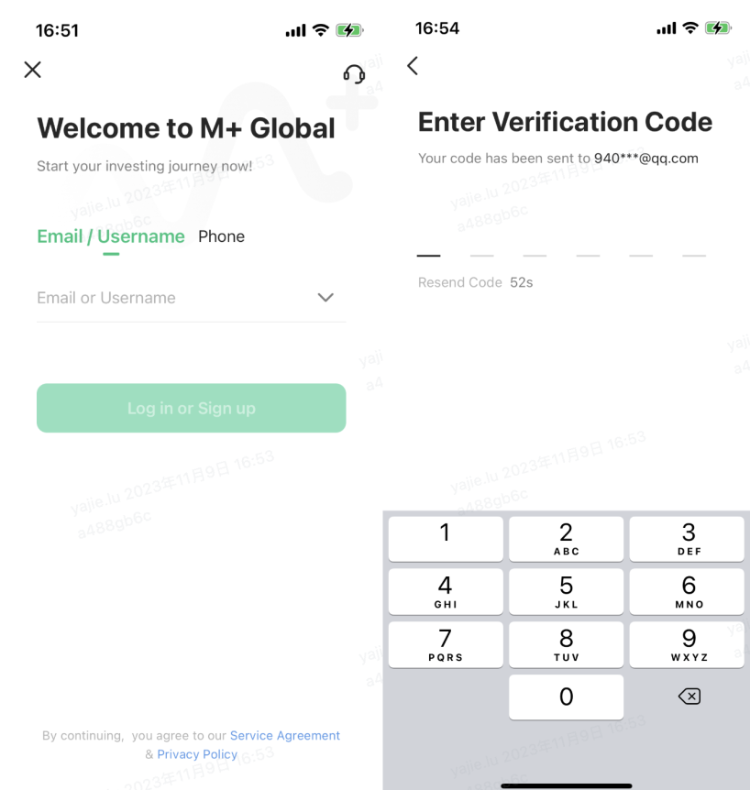
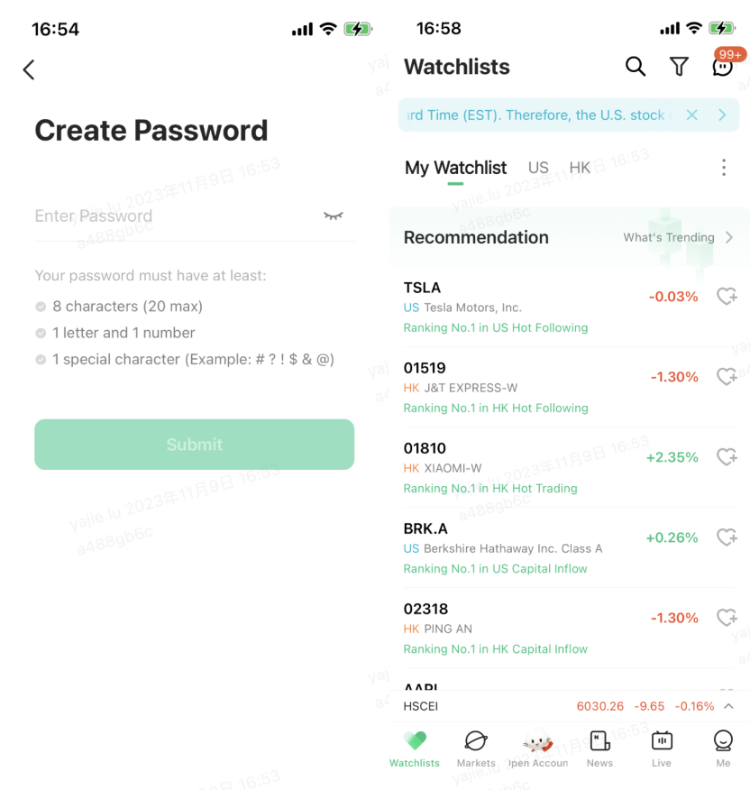
Once the app is installed, create your M+ Global account by following these steps:
- Choose to register via email or phone number, then click “Log in or Sign up”
- Enter the verification code sent to your phone or email address
- Set a secure login password
- Complete the registration
Step 3: Apply for Account Opening
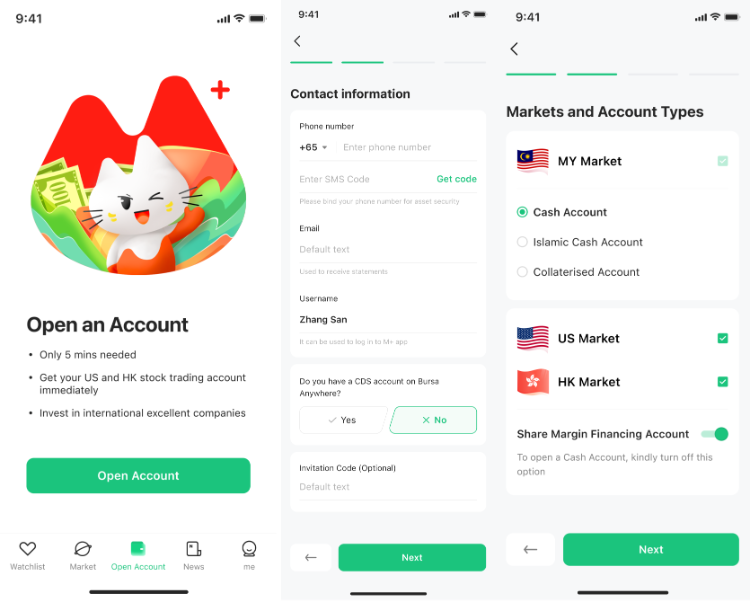
After registration, you’re ready to formally apply. Here’s how:
- Go to the “Account” page in the app and click “Get started”
- Enter your contact information
- Select which market(s) you want to trade (U.S., Hong Kong, or Malaysia) and choose your account type
Step 4: Complete Identity Verification (eKYC)
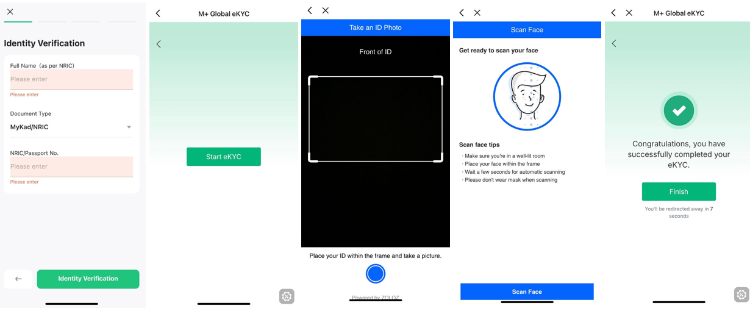
The app will ask you to verify your identity electronically. You’ll need to:
- Enter your name exactly as it appears on your NRIC or passport
- Select your document type: MyKad (Malaysian) or Passport (non-Malaysian)
- Take a clear photo of your ID—ensure there’s no glare or reflection for successful verification
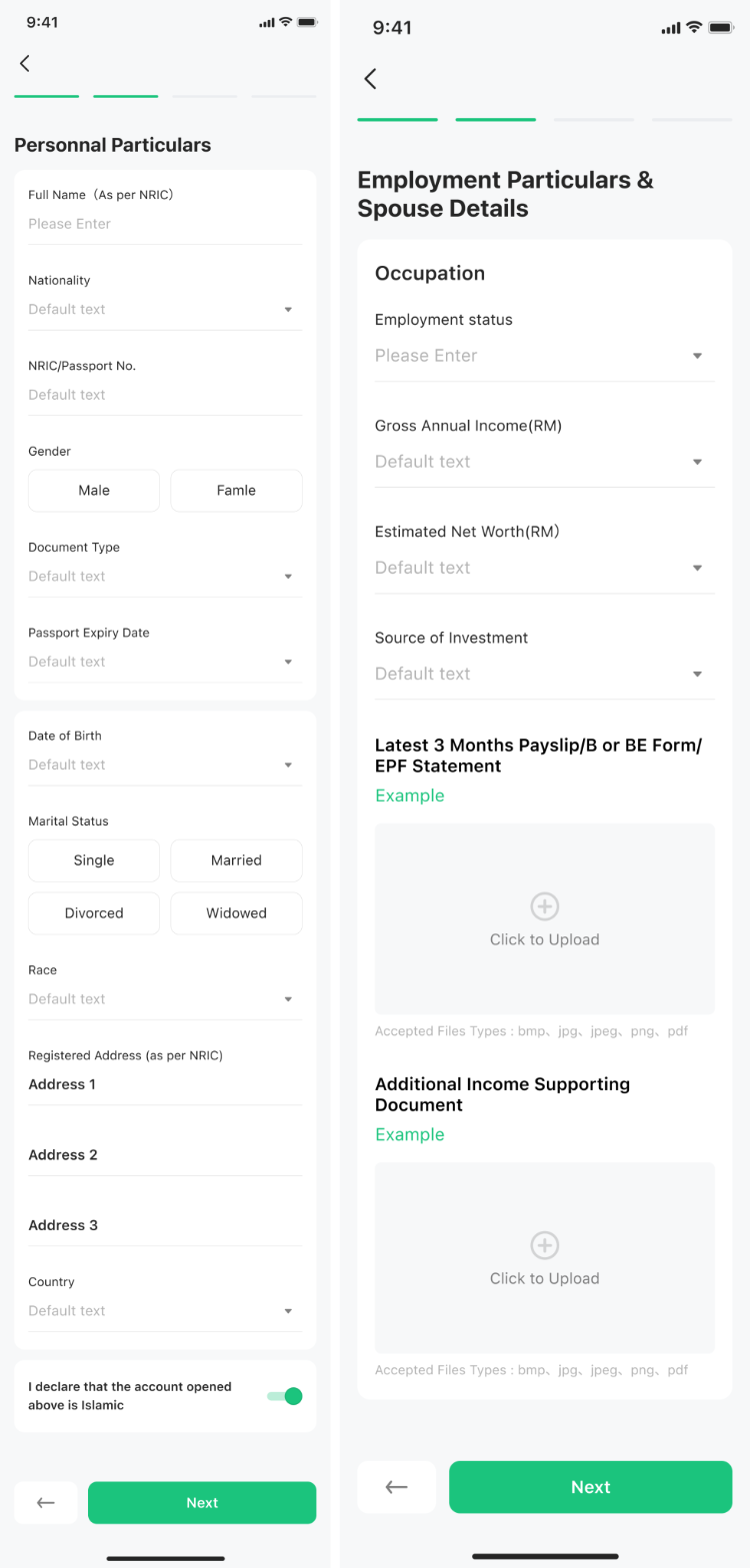
Step 5: Complete Your Profile
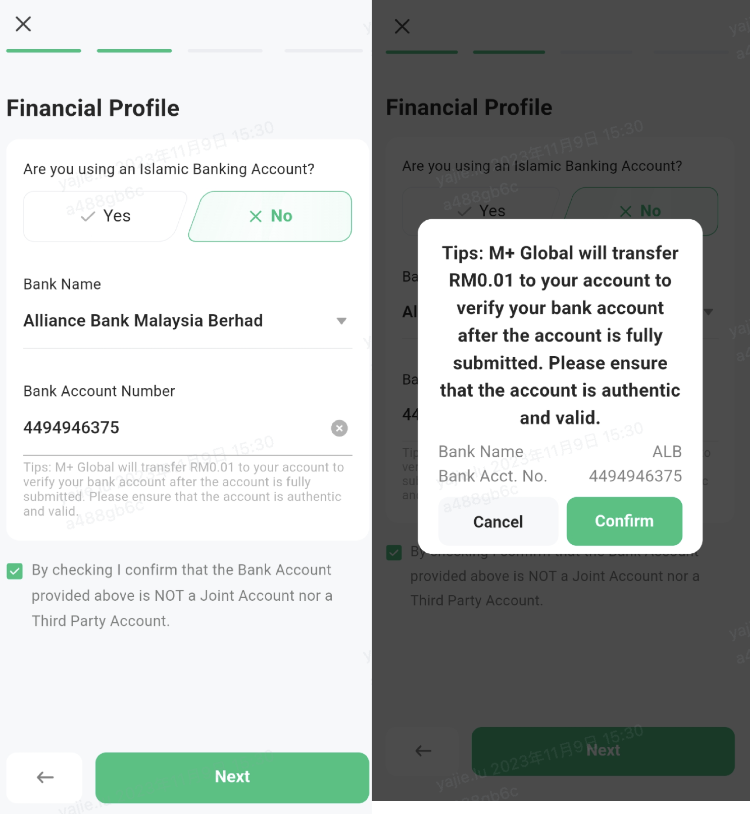
The application will guide you through entering the following information in order:
- Personal particulars (address, contact details, etc.)
- Employment details (employer name, job title, industry)
- Financial profile (income range, savings, investment experience)
Step 6: Investment and Tax Details
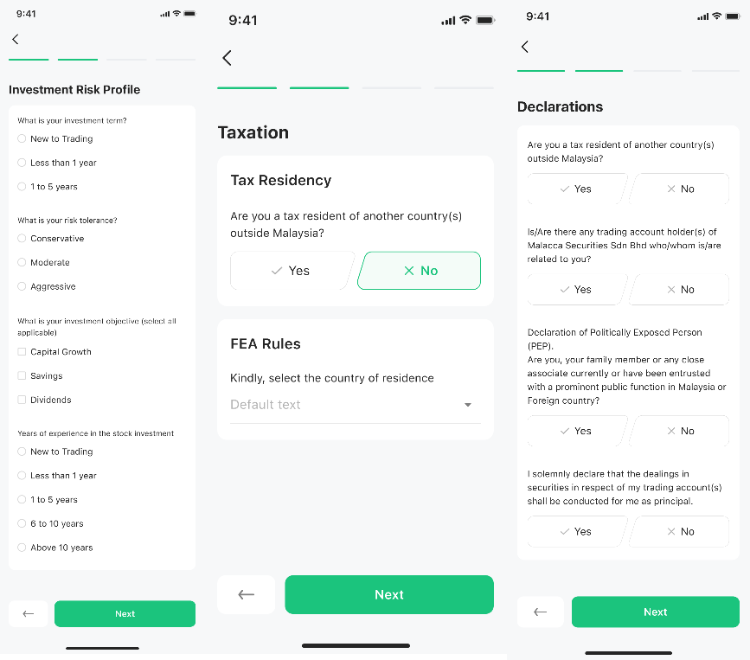
You’ll then provide:
- Investment details (which markets interest you, investment goals, experience level)
- Taxation details (residency status and any other required tax information)
Step 7: Accept Declarations and Sign
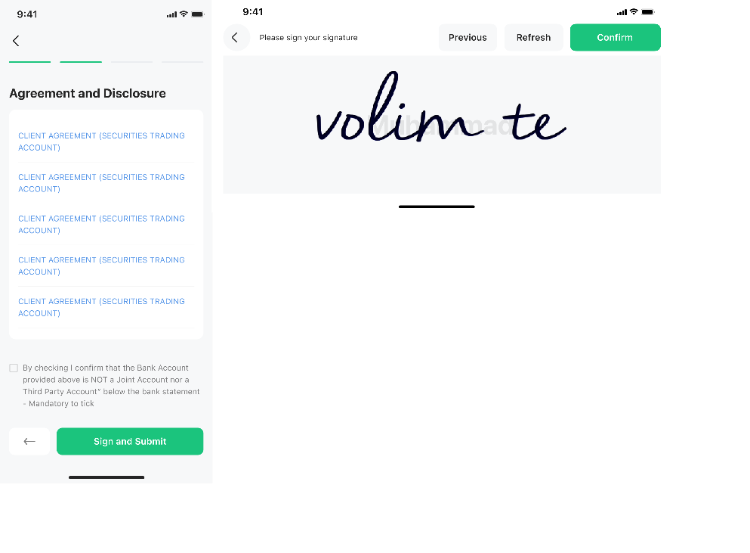
Review all the necessary declarations carefully, then accept and digitally sign the account opening agreement in the app.
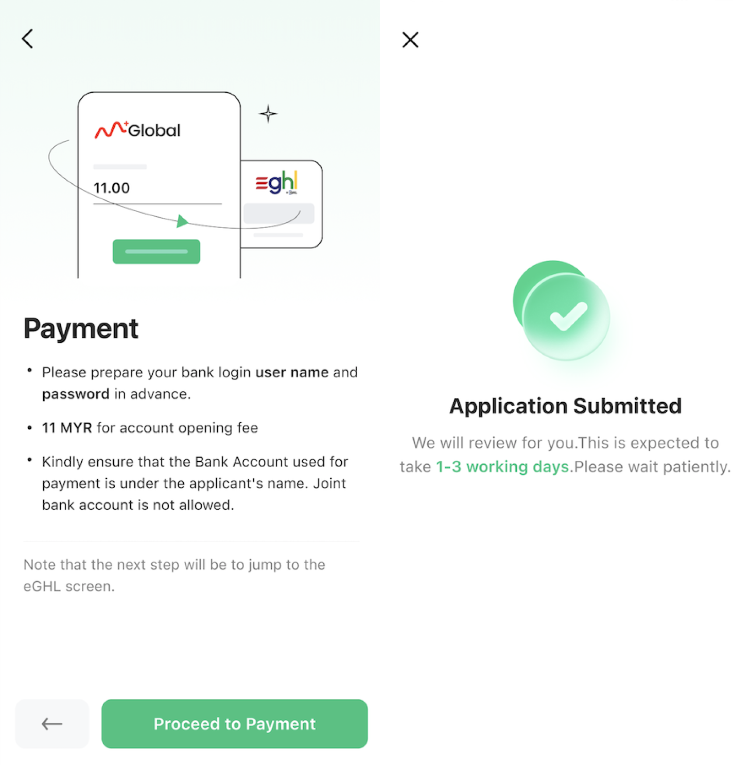
Step 8: Pay the Opening Fee and Submit
Pay the account opening fee of RM11, then submit your application for approval. The company typically processes applications quickly, and you’ll receive confirmation once approved.
Remisier tip: Double-check all your information before submitting—especially your name, ID number, and bank account details. Any errors can delay approval. Once submitted, the process usually completes within a few working days.
Key Takeaways
- M+ Global offers three account types: Cash (simplest, no leverage), Margin (borrowing for U.S./HK markets), and Collateral Trading (Malaysia market with leverage)
- The entire opening process is online and takes just a few minutes—no branch visit needed
- You’ll need your Malaysian ID, bank account access, and recent income documents
- Identity verification uses eKYC technology, so take a clear photo of your ID with no glare
- The account opening fee is RM11, and most applications are approved quickly
- Start with a cash account if you’re new; you can upgrade later as your skills grow
Frequently Asked Questions
How long does it take to open an M+ Global account?
The application itself takes just a few minutes to complete in the app, and most applications are approved within a few working days once submitted. You can start investing as soon as your account is approved.
What’s the minimum amount I need to deposit to start trading?
The source only specifies that you need an existing Malaysian bank account with a minimum balance of RM11 for the opening fee. Once your account is open, the amount you deposit to begin trading depends on your chosen account type and investment goals.
Can I open a margin account if I’m a beginner?
Yes, you can open any account type—margin, cash, or collateral trading—when you first apply. However, as a beginner, starting with a cash account is recommended so you can learn without leverage risk, then upgrade when you’re ready.
What happens if I submit wrong information in my application?
It’s important to double-check all details—especially your name, ID number, and bank account information—before submitting. Errors can delay approval. If you notice a mistake after submission, contact M+ Global support to correct it.
Do I need to be in Malaysia to open an account?
No, the entire process is online and can be completed from anywhere. However, you do need a Malaysian ID card (or passport) and an existing Malaysian bank account to open the application.
More M+ Global guides
Open your M+ Global account with Dexter Chia
Sign up in the M+ Global app with Invitation Code UBZQ to get AI automated tools, AI stock analysis and AI alerts — and a remisier you can actually reach.
WhatsApp: +60169059789 | Why choose Dexter?
Source: based on the official M+ Global Help Centre (Malacca Securities Sdn Bhd). Fees, hours and procedures are set by Malacca Securities and the exchanges and may change — check the M+ Global app or ask your remisier for the latest.
Disclaimer: This guide is for general information only and is not financial advice.