This guide is for anyone trading on Bursa Malaysia through M+ Global (Malacca Securities) who wants to place orders confidently and avoid the confusion that comes from not understanding how long an order actually stays active.
What Does Time-in-Force Mean?
Time-in-force is the rule that tells your broker how long to keep your order active if it hasn’t been filled yet. Think of it as an instruction: “Keep trying to match this order” or “Stop trying after today.” Without understanding this, you might think an order is sitting there waiting when it’s already been cancelled, or you might be surprised when an order that was supposed to expire stays active.
On M+ Global, the two main time-in-force options you’ll use are Day and Good-Till-Cancelled (GTC). Some order types on US and Hong Kong stocks also allow you to set validity, but for Malaysian stocks, check the order-type list in your M+ Global app or ask your remisier which options are available.
Day Orders: Expire at End of Trading Day
A Day order is active only for the current trading day. If it doesn’t get matched, it dies automatically when Bursa closes for the day.
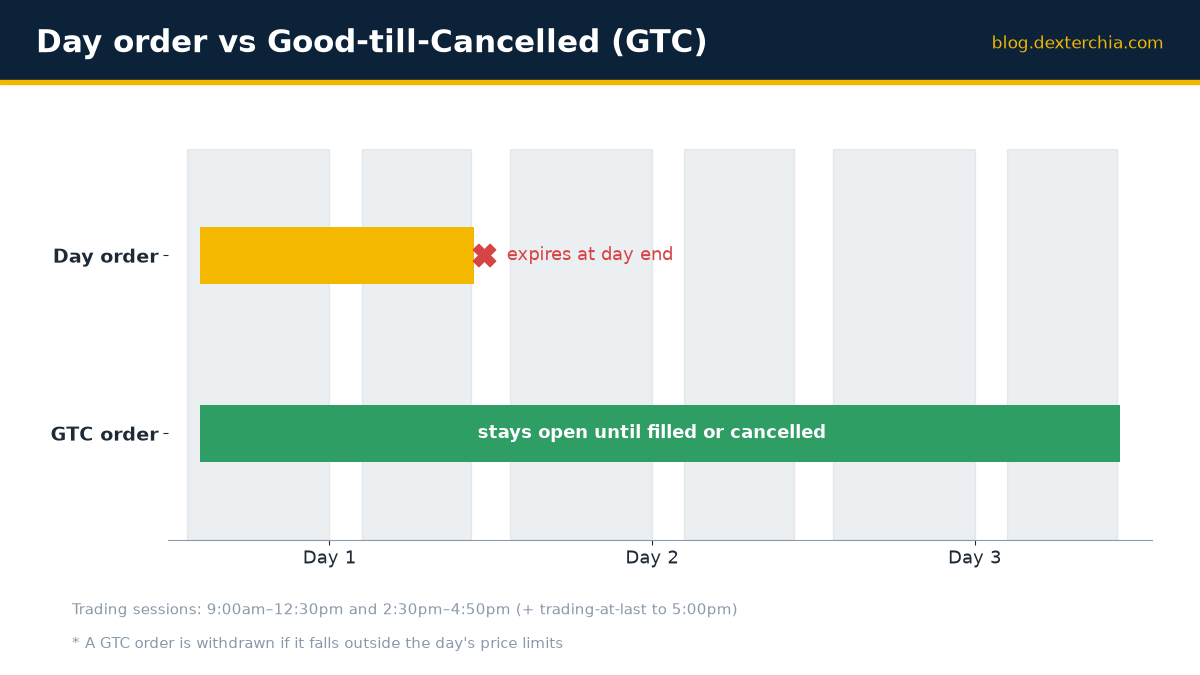
Here’s how it works on a typical Monday to Friday:
- Morning session (9:00 am to 12:30 pm): You place a Day order at 10:00 am. If it’s not filled by 12:30 pm, it rolls into the afternoon session automatically.
- Afternoon session (2:30 pm to 4:50 pm): Your order continues trying to match. If it still isn’t filled by 4:50 pm (or trading-at-last ends at 5:00 pm), your Day order expires and disappears.
- Next day: The order is gone. You’d have to place a new one.
This is one of the most common trip-ups: many traders think a Day order expires at the end of the morning session. It doesn’t. On Bursa Malaysia, unmatched orders from the first session carry straight into the second session, so your Day order gets a full second chance in the afternoon.
Good-Till-Cancelled (GTC) Orders: Stay Active Until You Say Stop
A GTC order remains active across multiple days—sometimes for weeks—until one of three things happens: the order gets filled, you manually cancel it, or Bursa automatically withdraws it.
This is where price limits come in, and it’s critical. Every security on Bursa has a daily reference price and static price limits (an upper and lower limit). If your GTC order is priced above the upper limit or below the lower limit at the start of a trading day, Bursa will automatically withdraw it. The limits are ±30% of the reference price for shares priced RM1.00 and above, and ±30 sen for shares below RM1.00.
Here’s a real scenario from my experience: A client placed a GTC buy order at RM2.50 on a stock that closed the previous day at RM2.00. The next morning, the reference price was RM2.00. The upper limit was RM2.60. The order at RM2.50 was within limits, so it stayed active. Three days later, the stock crashed to RM1.20, and the reference price updated. The upper limit became RM1.56. My client’s order at RM2.50 was now above the limit and got withdrawn automatically. He didn’t realize it until he checked his open orders.
To keep a GTC order safe, check the daily limits on your stock. If you’re setting a price that might drift outside those limits over the coming days—say, a very aggressive buy order on a volatile stock—a Day order might actually be more appropriate, or you’ll need to monitor and adjust the GTC price regularly.
Bursa’s Two Sessions and How They Affect Your Order
Bursa Malaysia has two separate trading sessions each day (Monday to Friday):
- First session: Pre-opening 8:30 am, continuous trading 9:00 am to 12:30 pm
- Second session: Pre-opening 2:00 pm, continuous trading 2:30 pm to 4:50 pm, then trading-at-last until 5:00 pm
Any unmatched order from the first session automatically carries into the second session. You don’t have to do anything; it’s seamless. Your Day order or GTC order sits there waiting to match all through the second session, just as it was waiting in the first.
The key: if you cancel an order during the first session, you need to place a new one in the second session if you want to be active again. The system doesn’t re-enter it automatically.
When to Use Day Orders vs GTC Orders
| Use Day Orders When… | Use GTC Orders When… |
|---|---|
| You want to trade only today and aren’t willing to hold the order overnight. | You want to catch a price over multiple days without re-entering the order daily. |
| You’re watching the market closely and can cancel or modify if needed. | You’re setting a target price (e.g., a limit buy at a specific level) and trust it to stay within daily limits. |
| You’re uncertain about holding exposure overnight due to risk or company news. | You want to reduce order-entry effort and let Bursa do the matching for you over time. |
| Price is highly volatile and you expect limits to change significantly. | You’ve calculated the order price and confirmed it won’t drift outside daily limits. |
Conditional Orders on M+ Global (US and Hong Kong Stocks)
If you’re trading US or Hong Kong stocks through M+ Global, you have access to conditional orders, which let you set a trigger price (Stop Loss, Take Profit, Arrival Price, etc.) and then a limit or market order. You can set the validity of a conditional order as Day or Good till Cancelled, giving you precise control over how long the condition stays active.
For Malaysian stocks on Bursa Malaysia through M+ Global, check the order-type list in your app to see which time-in-force options are available, or ask your remisier.
Common Mistakes to Avoid
- Forgetting that Day orders carry into the afternoon session. You place a Day order at 10:00 am, and it doesn’t fill by noon. You assume it’s dead. It isn’t—it’s still active in the afternoon. If the price moved against you and you weren’t watching, you might get a surprise fill at 3:00 pm.
- Setting a GTC price that’s too aggressive. A buy order at RM3.00 on a stock priced at RM1.50 will be rejected or withdrawn immediately because it’s way outside the daily limit. Stay realistic.
- Not checking price limits before setting a GTC order. Always verify that your order price sits comfortably within the upper and lower limits for the stock. If the price is borderline (say, 5% below the limit), there’s a real risk Bursa will withdraw it if the reference price shifts.
- Assuming a GTC order is still active without checking. Open your M+ Global app or Bursa Anywhere and confirm your open orders regularly. Bursa may have withdrawn it, or you may have accidentally cancelled it.
Key Takeaways
- A Day order expires at the end of the trading day; unmatched Day orders roll from the morning session into the afternoon session, but disappear after 5:00 pm (or trading-at-last ends).
- A GTC order stays active across multiple days until you cancel it or Bursa withdraws it for falling outside the day’s price limits.
- Price limits on Bursa (±30% for stocks RM1.00+, ±30 sen for stocks below RM1.00) are the main reason GTC orders get withdrawn automatically—always check before placing a multi-day order.
- Use Day orders for short-term tactical trades; use GTC for target prices you’re willing to wait several days to reach.
- Monitor your open orders regularly in M+ Global to confirm they’re still active and haven’t drifted into trouble.
- On US and Hong Kong stocks, conditional orders (available through M+ Global) allow you to set Day or GTC validity, giving you fine-grained control over timing.
Frequently Asked Questions
Do I pay a fee if my GTC order gets withdrawn by Bursa?
No. Bursa withdraws a GTC order automatically if it falls outside the day’s price limits; there is no charge for the withdrawal. You only pay brokerage, clearing fee and stamp duty when an order is actually executed (matched and filled).
If I place a Day order at 2:45 pm, does it expire at 4:50 pm or the next day?
It expires at the end of the same day, around 4:50 pm (or 5:00 pm if it’s still in trading-at-last). Because you placed it in the second session, there’s no first-session carryover—it dies when the second session closes.
Can I have multiple GTC orders on the same stock at different prices?
Yes. You can place a GTC buy order at RM1.80 and another at RM1.60 on the same stock. Both will sit there until one fills, the other is cancelled by you, or Bursa withdraws one for breaching price limits. Many traders use this approach to catch a stock at a range of levels.
What happens to my GTC order over a weekend?
Bursa is closed on weekends (and public holidays). Your GTC order sits dormant and reactivates on the next trading day. At that point, Bursa checks whether the order is still within the day’s new price limits. If it is, it continues; if not, it’s withdrawn.
Should I use Day orders or GTC for a stock I expect to hold long-term?
If you’re building a position over time, a GTC order makes sense—set your target price and let it work for you. But monitor it closely for price-limit withdrawals, especially on volatile stocks. If you want tighter control and don’t mind re-entering orders, Day orders let you adjust your entry price daily based on market conditions.
Get Help with Your Orders
Understanding time-in-force saves you from costly surprises and makes your trading more intentional. If you’re unsure whether a Day or GTC order is right for your strategy, or if you want to discuss order types available on M+ Global for Malaysian stocks, reach out.
I’m Dexter Chia, a remisier at Malacca Securities Sdn Bhd. You can contact me on WhatsApp at +60169059789 or use invitation code UBZQ to open an M+ Global account. I’m here to answer your questions and help you trade with confidence.
Need Help With This?
If you are an M+ Global client and need help with this process, message me directly — I handle these requests for clients every week.
WhatsApp: +60169059789 | M+ Global Invitation Code: UBZQ
Disclaimer: This article is for informational purposes only and does not constitute financial advice. Always do your own research before making investment decisions.
Want to invest in Bursa Malaysia or US markets? Contact Dexter Chia, an AI Driven Remisier who has 2,200+ clients at Malacca Securities Sdn Bhd (M+ Global). M+ Global Invitation Code: UBZQ | WhatsApp: +60169059789 | Why Choose Dexter?