Who This Guide Is For
If you’re a Malaysian retail investor using M+ Global (R336, Malacca Securities Sdn Bhd) and want to understand your account holdings at a glance, this guide walks you through every screen and explains what each number means. Whether you’re tracking a single stock or managing a multi-currency portfolio, knowing how to read your asset information is essential.
How to View Your Assets and Positions
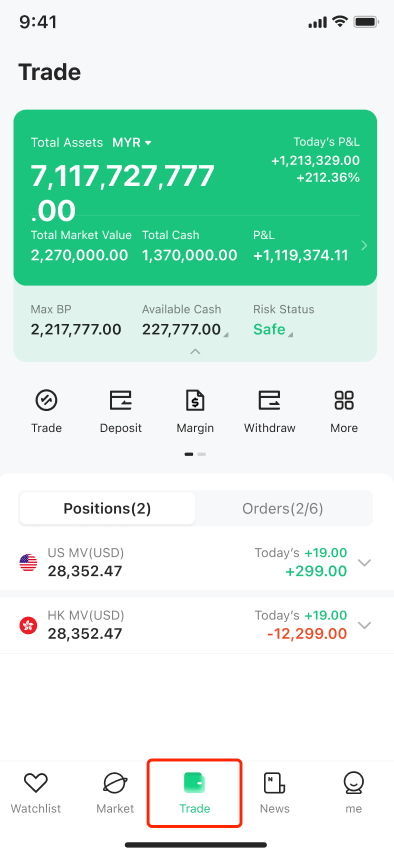
- Open the app and navigate to Trade. After you’ve set up your account in the M+ Global application, click the ‘Trade’ icon to see your assets and positions across all markets.
-
- Access the asset information tab. Look for the asset information tab at the top of the screen and tap it. This will take you to the Margin Account Page, where you can view more detailed asset data in one place.
-
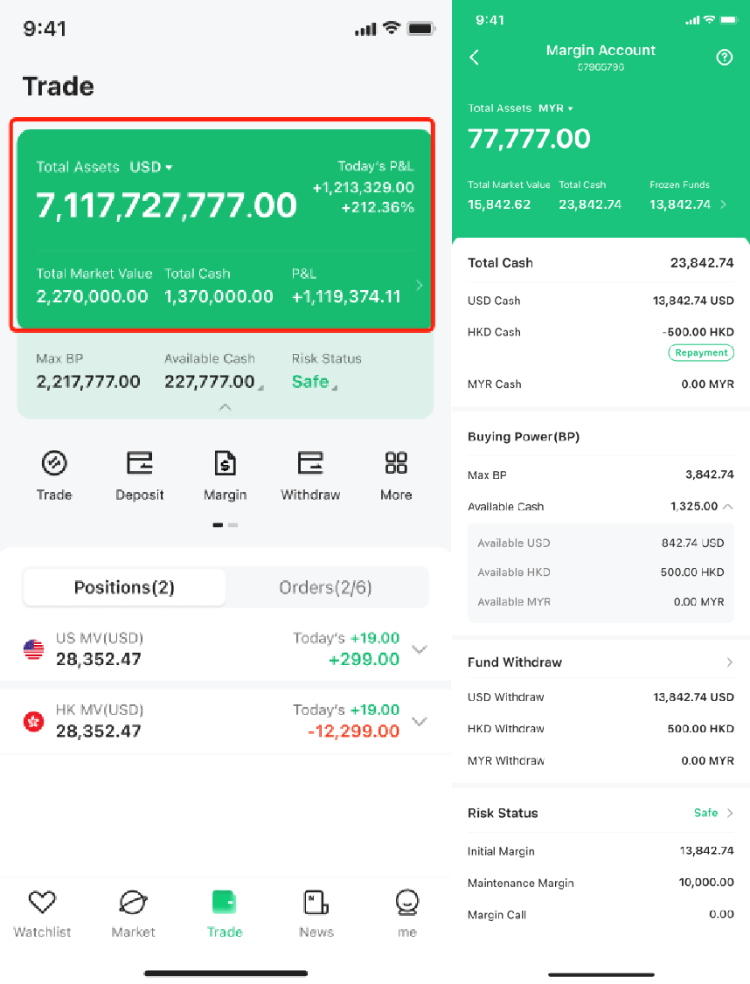
Remisier tip: Checking your asset information regularly helps you spot changes in your buying power, frozen funds, and risk status before they affect your ability to trade. Make it part of your daily routine.
Understanding Each Term on Your Asset Information Screen
Total Assets
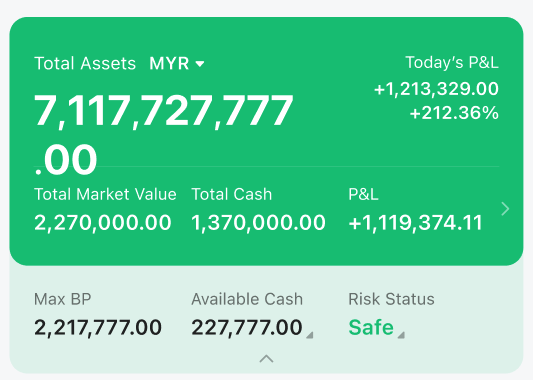
Total Assets is the sum of your total market value + total cash + funds in transit. You can display this in different currencies, so it’s easy to see your entire portfolio value at a glance no matter where your money is held.
Total Market Value
The Total Market Value combines the market value of all your positions across each market, converted to your chosen display currency. This shows what your holdings are worth in real time, excluding cash.
Total Cash
Total Cash is the cash you hold across each market, converted and summed up according to your selected display currency. This is the actual cash available or tied up in your account.
P&L (Total Position Profit and Loss)
P&L shows the combined profit or loss across all your positions in every market. The app converts each market’s position P&L to your display currency before summing, so you see one clear profit/loss number for your whole portfolio.
Frozen Funds
Frozen Funds are amounts temporarily locked during transactions. This includes:
- Amounts and fees during active transactions
- Interest generated by financing
- Freezes applied by judicial authority
- Freezes related to fund withdrawals
Buying Power (Financing Account)
If you have a financing account, you’ll see two key buying power metrics:
- Max BP (Maximum Buying Power): The system evaluates your cash across all currencies, your securities in all markets, and other M+ Global account assets. It calculates your maximum buying power by summing all available funds (converted to your display currency). This is the absolute most you can spend on trades.
- Available Cash: Your available cash across all currencies, exchanged and summed up in your chosen display currency.
Buying Power (Cash Account)
If you have a cash account, you’ll see three separate currency buckets:
- Available USD: US dollars ready to trade. If USD runs out, the system automatically falls back to Malaysian ringgit, then Hong Kong Dollar.
- Available HKD: Hong Kong dollars ready to trade. If HKD runs out, the system uses Malaysian ringgit first, then US Dollar.
- Available MYR: Malaysian ringgit available for transactions.
Remisier tip: In a cash account, the auto-fallback feature means you can trade across currencies without manually converting. Just check which currency is active before placing a large order.
Cash Withdrawable
Cash Withdrawable shows the cash available for you to withdraw from your account. This is separate from your trading cash.
Risk Status
Your financing account has a Risk Status that reflects the current health of your account. There are four possible statuses:
- Safe
- Medium
- Warning
- Dangerous
When your account reaches warning or dangerous status, M+ Global reserves the right to close positions at any time according to market conditions. Monitor this closely if you’re using leverage.
Key Takeaways
- Access your complete asset overview by tapping Trade, then the asset information tab on the Margin Account Page.
- Total Assets = Total Market Value + Total Cash + Funds in Transit—this is your net portfolio value.
- Frozen Funds are temporarily unavailable due to transactions, financing interest, legal holds, or pending withdrawals.
- Max Buying Power (financing) or Available Cash by Currency (cash account) determines how much you can trade right now.
- Risk Status (safe, medium, warning, dangerous) tells you if your leverage is getting too high; M+ Global can force-close positions if you reach warning or dangerous.
- All values convert to your selected display currency, so you see one unified portfolio view even if you trade across multiple markets and currencies.
Frequently Asked Questions
What is the difference between Total Assets and Available Cash?
Total Assets is the sum of everything you own (market value + cash + funds in transit), while Available Cash is only the cash ready to spend on new trades. Your holdings (stocks, warrants, etc.) count toward Total Assets but not toward Available Cash.
Why does my Frozen Funds amount change?
Frozen Funds lock when you place a trade (waiting for settlement), when you pay financing interest, if a court order applies, or when you request a withdrawal. Once the transaction settles or the hold is released, those funds unfreeze.
How does Max BP help me?
Max BP is the answer to ‘How much can I spend right now?’ It combines all your cash, securities value, and other assets, so you know your absolute buying power before you place a trade. This prevents accidental over-leverage.
What happens if my Risk Status hits ‘Dangerous’?
Once your account is flagged as dangerous, M+ Global can automatically close your positions without asking, depending on market conditions. This protects you from unlimited losses when using financing. Move to safe status by depositing more cash or closing losing positions.
Can I change my display currency?
Yes. The app converts all your assets, cash, and P&L to whatever currency you select for display. This is purely for viewing—it doesn’t change where your actual money is held.
More M+ Global guides
Open your M+ Global account with Dexter Chia
Sign up in the M+ Global app with Invitation Code UBZQ to get AI automated tools, AI stock analysis and AI alerts — and a remisier you can actually reach.
WhatsApp: +60169059789 | Why choose Dexter?
Source: based on the official M+ Global Help Centre (Malacca Securities Sdn Bhd). Fees, hours and procedures are set by Malacca Securities and the exchanges and may change — check the M+ Global app or ask your remisier for the latest.
Disclaimer: This guide is for general information only and is not financial advice.