Who This Guide Is For
If you’re a Malaysian retail investor holding cash or profits in M+ Global and want to move that money back to your local bank account, this guide walks you through every step—and explains the rules you need to follow.
Important Withdrawal Rules Before You Start
Before you request a withdrawal, make sure you meet these requirements:
- Your bank account must be opened with a local bank in Malaysia. Virtual banks and third-party payment platforms (like e-wallets) are not allowed.
- Only MYR withdrawals are allowed. If you’re holding USD or HKD from trading US or Hong Kong stocks, those will be automatically converted to MYR at the prevailing exchange rate when your withdrawal is approved.
- No amount can be withdrawn to virtual banks or payment platforms. Your destination account must be with a licensed Malaysian bank.
Remisier tip: Double-check your bank account details before submitting. A typo in your account number can delay your withdrawal significantly.
Withdrawal Methods & Fees
|
Transfer Method |
Steps To Transfer |
Review Period |
Estimated Transfer Time |
Service Fee |
|
Bank transfer |
Apply for withdrawal in the M+Global APP |
1–3 working days |
Depending on the bank’s processing progress |
Free of charge* |
Fee note: If your withdrawal amount is equal to or below RM100, a RM1.08 handling fee will be charged. All other withdrawals are free.
The review period is M+ Global’s estimated processing time and may be extended during non-trading hours.
Understanding Currency Conversion
If you hold US dollars or Hong Kong dollars from your stock trades, here’s how conversion works:
- When you submit a withdrawal request, the app shows an estimated MYR amount based on the exchange rate at that moment.
- Your withdrawal application is then reviewed (1–3 working days).
- When approved, the actual MYR amount you receive is calculated using the prevailing exchange rate at the time of approval—not the rate shown when you submitted.
- There may be a small difference between the estimated amount and the actual amount received, depending on whether exchange rates moved in your favour or against you.
Always keep this in mind: the figure you see during submission is a reference only, not a guarantee of the final amount.
Step-by-Step: How to Withdraw
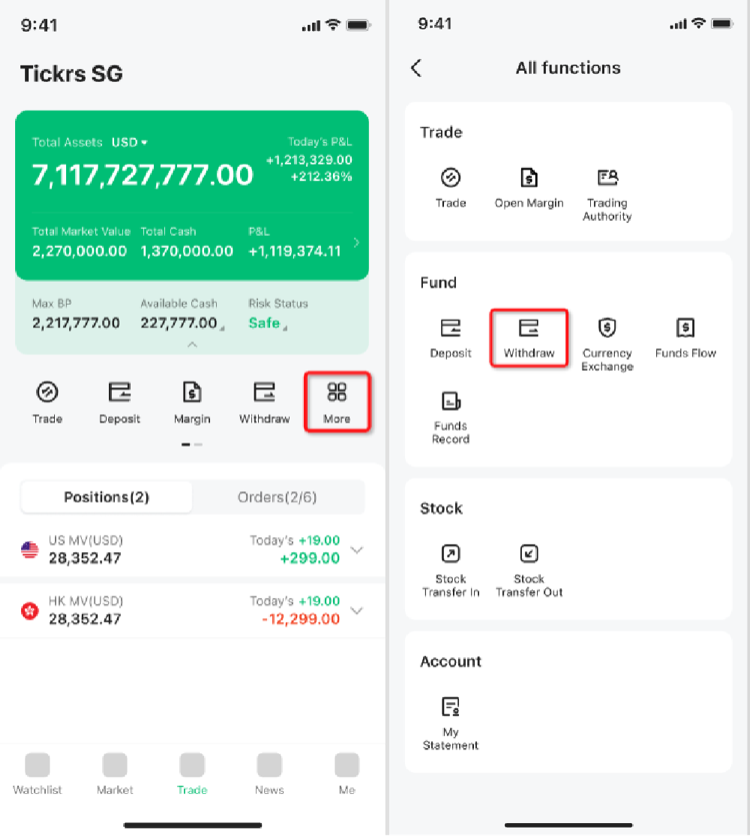
Step 1: Open the Withdrawal Page
- Open the M+ Global App.
- Go to the “Trade” tab.
- Tap “More” to access additional options.
- Select “All functions” from the menu.
- Tap “Withdraw” to proceed.
Step 2: Enter Your Withdrawal Details
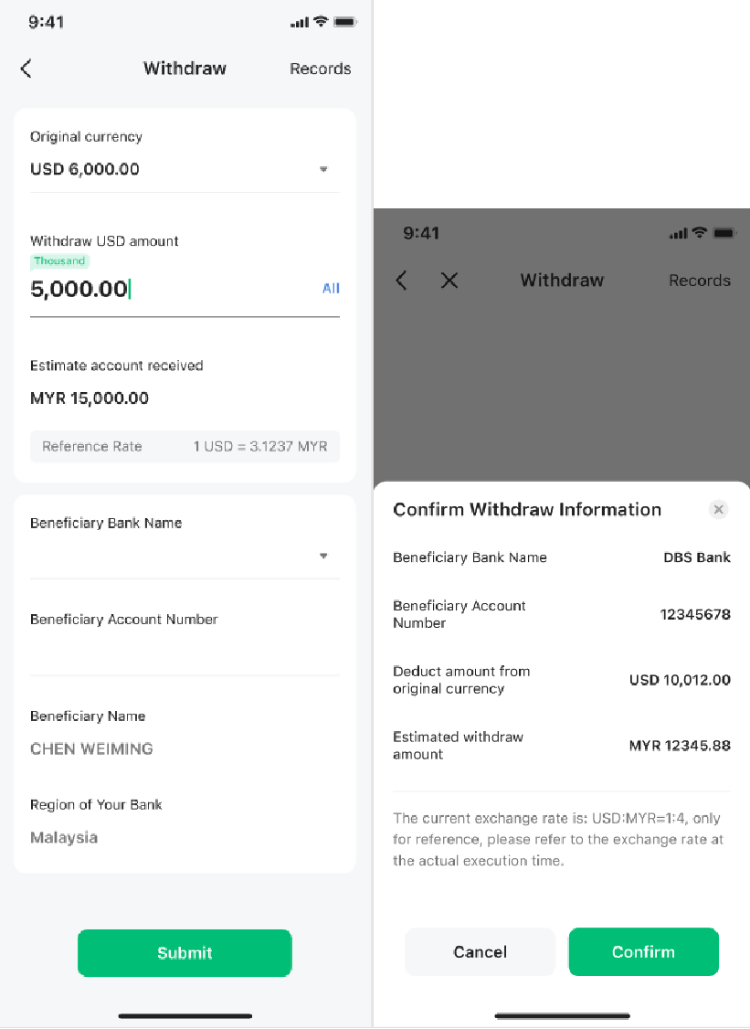
The withdrawal form will display several fields:
- Original currency: Shows your available cash balances in different currencies. Select the currency you wish to withdraw.
- Withdraw amount: Enter the amount in the original currency you want to withdraw.
- Estimate amount received: The app automatically shows the estimated MYR amount you’ll receive after conversion (if applicable). Remember, this is an estimate only.
- Beneficiary Bank Name: Select your Malaysian bank from the dropdown menu.
- Beneficiary Account Number: Enter your account number carefully—verify it twice.
- Tap “Submit” and then confirm by clicking “Confirm” in the popup window.
Step 3: Enter Your Trading Password
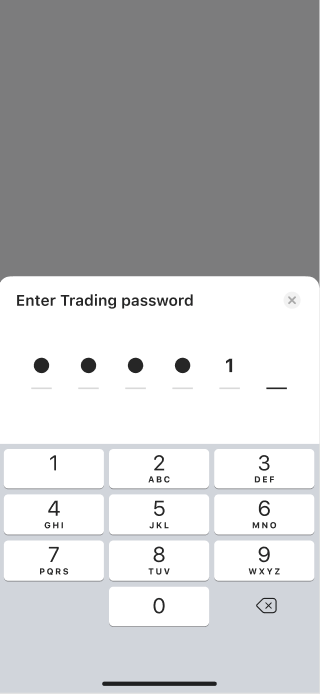
For security, you’ll be prompted to enter your trading password to authorize the withdrawal request.
Step 4: Submit for Review
Your withdrawal application is now submitted. M+ Global will approve or reject it within 1–3 working days. Once approved, the actual time for the funds to appear in your bank account depends on your bank’s internal processing speed—this can vary.
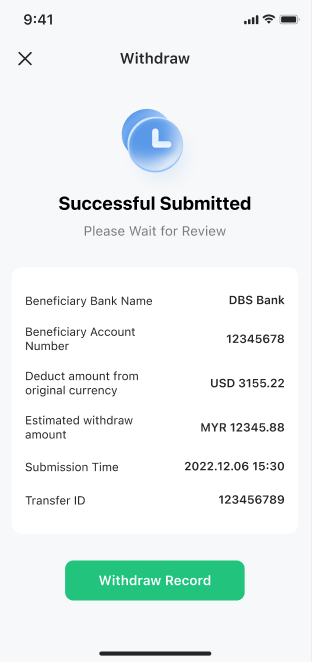
Remisier tip: Check your M+ Global app notifications or email for approval status. If rejected, review the reason and resubmit with corrected details.
Key Takeaways
- Withdrawals must go to a Malaysian bank account only—no virtual banks or e-wallets.
- You can only withdraw in MYR; foreign currencies are converted at the approval rate, which may differ from the rate shown at submission.
- Most withdrawals are free, except amounts ≤RM100 (RM1.08 fee applies).
- M+ Global’s review takes 1–3 working days; final bank deposit depends on your bank’s speed.
- Always verify your account number and bank details before confirming your withdrawal.
- Review periods may extend during non-trading hours.
Frequently Asked Questions
How long does a withdrawal take from M+ Global?
M+ Global reviews your withdrawal request within 1–3 working days. Once approved, the time for funds to reach your bank account depends on your bank’s processing speed. Non-trading hours may extend the review period.
Can I withdraw to a virtual bank or e-wallet?
No. Withdrawals are only allowed to accounts opened with local banks in Malaysia. Virtual banks and third-party payment platforms are not accepted.
Is there a fee for withdrawing from M+ Global?
Withdrawals are free of charge, except for amounts equal to or below RM100, which incur a RM1.08 handling fee.
What if I hold USD or HKD—how are they withdrawn?
USD and HKD holdings are automatically converted to MYR at the prevailing exchange rate when your withdrawal is approved. The estimated amount shown at submission is for reference only; the actual MYR amount may differ slightly.
What should I do if my withdrawal is rejected?
Check your app or email for the rejection reason. Common issues include incorrect account details or a non-qualifying account type. Correct the information and resubmit your application.
More M+ Global guides
Open your M+ Global account with Dexter Chia
Sign up in the M+ Global app with Invitation Code UBZQ to get AI automated tools, AI stock analysis and AI alerts — and a remisier you can actually reach.
WhatsApp: +60169059789 | Why choose Dexter?
Source: based on the official M+ Global Help Centre (Malacca Securities Sdn Bhd). Fees, hours and procedures are set by Malacca Securities and the exchanges and may change — check the M+ Global app or ask your remisier for the latest.
Disclaimer: This guide is for general information only and is not financial advice.