Who This Guide Is For
This guide is for Malaysian retail investors with M+ Global accounts who want to fund their securities trading account. Whether you’re new to online trading or need a refresher on the deposit process, this will walk you through every step.
Important Things to Know Before You Deposit
Before you start, understand these key rules so your deposit goes smoothly and you avoid delays or refunds.
- Only MYR deposits from Malaysian banks. You can only deposit Malaysian Ringgit (MYR) from a bank account opened with a local Malaysian bank. The platform does not accept cash deposits at counters or ATMs.
- Your account name must match. The bank account you’re transferring from must be in your name—the exact same name as your M+ Global account. Deposits from other people’s accounts or joint accounts are not allowed. If you make a mismatch, you pay for any refund costs yourself.
- Bank processing takes time. Deposits are processed on working days only. Public holidays and festivities in Malaysia will affect timing, so plan ahead and allow enough time for your bank to complete the transfer.
- Minimum and maximum amounts apply. You must deposit between 100 and 30,000 MYR in a single transaction.
Remisier tip: I always remind clients to check the Malaysia public holiday calendar before making deposits. If you need funds urgently for a trade, deposit at least one working day in advance to avoid disappointment.
How Deposits Are Processed
Once you submit a deposit, two things can happen:
- Automatic approval (5 minutes): If you transfer from a bank account with the same name as your M+ Global account, the system approves it automatically and credits your account within 5 minutes.
- Manual review (1–3 working days): If the account name doesn’t match or anything looks unusual, M+ Global’s team will review it. This takes up to 3 working days on working days only.
Step-by-Step: How to Deposit Into M+ Global
Step 1: Check Your Setup
- Make sure you have a local Malaysian bank account in your own name.
- Ensure that account has at least the amount you want to deposit.
- Verify your M+ Global account is fully set up and active.
Step 2: Open the M+ Global App and Start Deposit
- Open the M+ Global App on your phone or tablet.
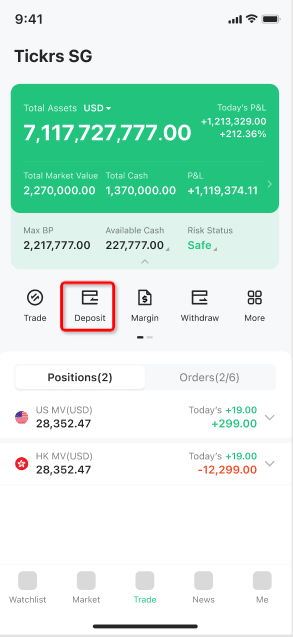
- Go to the Trade tab at the bottom.
- Tap Deposit.
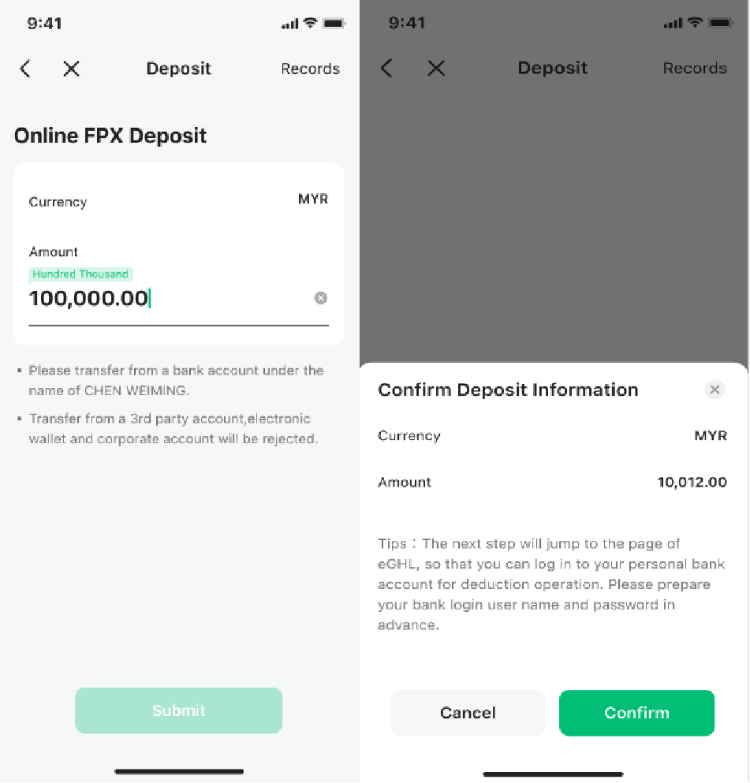
Step 3: Select Online FPX
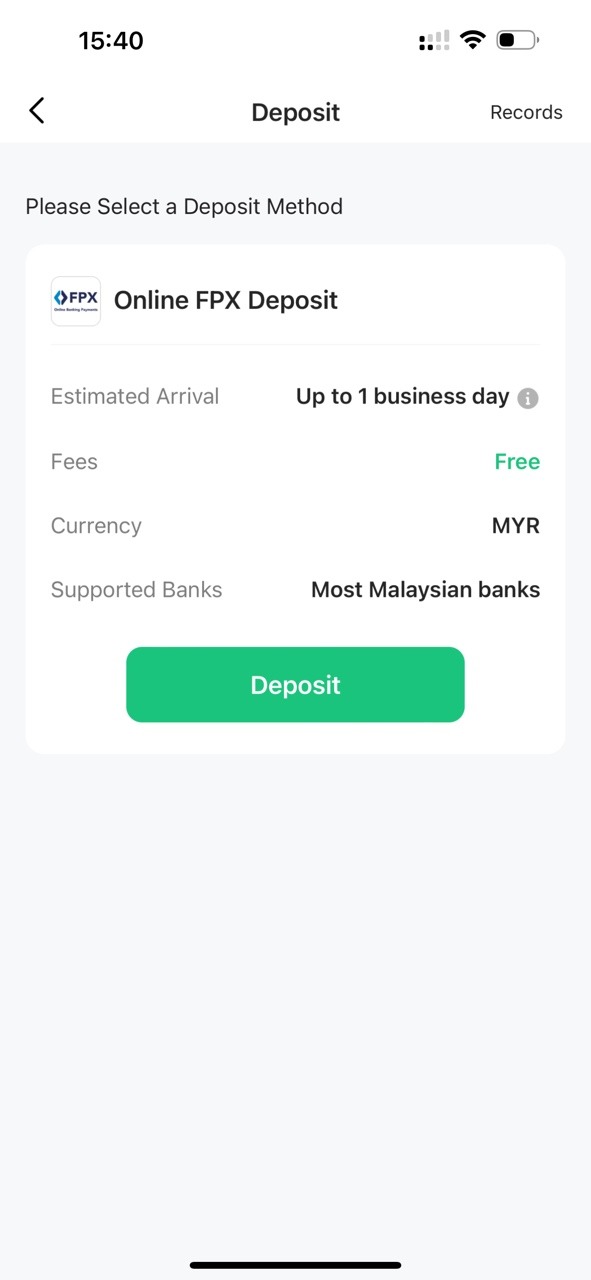
- On the deposit page, tap Online FPX Deposit. This is the only deposit method currently available.
Step 4: Enter Your Deposit Amount
- Type in the amount you want to deposit. It must be between 100 and 30,000 MYR.
- Check that all the information is correct.
- Tap Confirm.
Step 5: Complete Payment Through Your Bank
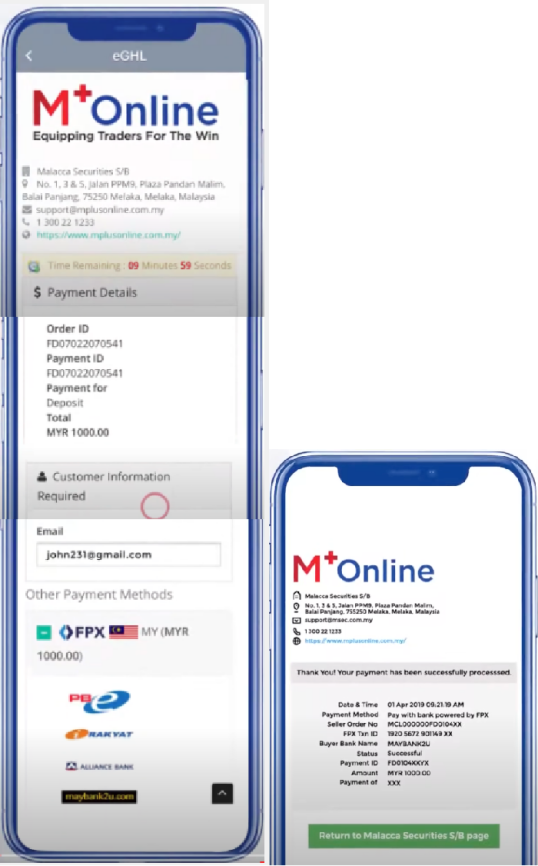
- You’ll be taken to the eGHL payment page (a secure payment gateway).
- Log in with your bank credentials as instructed.
- Review the payment details and confirm.
- Once payment is successful, tap Return to Malacca Securities S/B page to go back to the app.
Step 6: Submit for Review
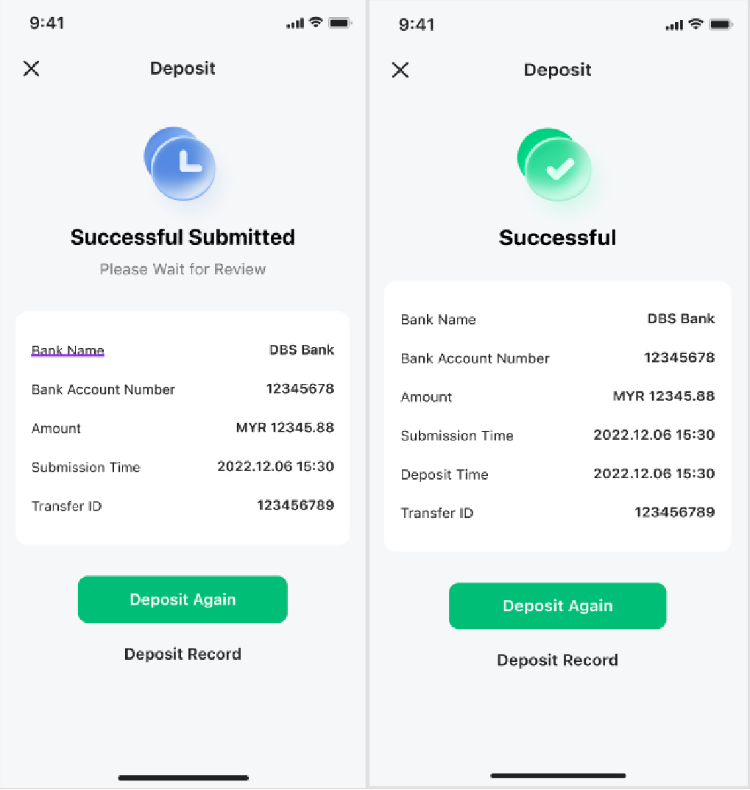
- Back in the app, submit your deposit for review.
- If your deposit is from an account with the same name, it will be approved automatically and you’ll see the success page right away.
- If manual review is needed, you’ll be notified within 1–3 working days.
Deposit Methods: What’s Currently Available
|
Transfer Method |
How to Use |
Time to Receive |
Fee |
|
Online FPX |
Start deposit in M+ Global App |
5 minutes |
Free of charge |
Note: The 5-minute estimate is the time for funds to arrive in your trading account. During non-trading hours, processing may take longer.
What Currency Can You Deposit?
Currently, only MYR deposits are accepted. However, once your MYR funds are in your M+ Global account, you can convert them into Hong Kong Dollars (HKD) or US Dollars (USD) when you’re ready to trade stocks on the Hong Kong or US markets.
Key Takeaways
- Deposit only in MYR from a Malaysian bank in your own name—no joint or third-party accounts.
- Use Online FPX in the M+ Global App; it’s free and takes 5 minutes if your name matches.
- Amounts must be between 100 and 30,000 MYR per deposit.
- Matching-name transfers are credited in 5 minutes; others need 1–3 working days of review.
- Plan around public holidays—deposits only process on working days.
- You pay for any refund costs if your deposit doesn’t match your account name, so double-check before confirming.
Frequently Asked Questions
Can I deposit into M+ Global from a joint bank account?
No. Your deposit must come from a bank account in your name alone. Joint accounts are not accepted. If you deposit from a joint account by mistake, you’ll be responsible for paying any refund fees.
How long does a deposit actually take?
If your bank account name matches your M+ Global account name exactly, your deposit is credited within 5 minutes. Otherwise, M+ Global’s team reviews it within 1–3 working days. Remember: public holidays and weekends are not working days, so plan ahead.
What’s the minimum and maximum I can deposit?
The minimum deposit is 100 MYR and the maximum is 30,000 MYR per transaction.
Can I deposit cash at a bank counter or ATM?
No. M+ Global does not accept cash deposits made directly at bank counters, ATMs, or any other physical channels. You must use Online FPX through the app.
Can I deposit in USD or other currencies?
No. At the moment, only MYR deposits are allowed. Once your MYR is in your account, you can convert it to HKD or USD for trading if you want to buy stocks in those markets.
More M+ Global guides
Open your M+ Global account with Dexter Chia
Sign up in the M+ Global app with Invitation Code UBZQ to get AI automated tools, AI stock analysis and AI alerts — and a remisier you can actually reach.
WhatsApp: +60169059789 | Why choose Dexter?
Source: based on the official M+ Global Help Centre (Malacca Securities Sdn Bhd). Fees, hours and procedures are set by Malacca Securities and the exchanges and may change — check the M+ Global app or ask your remisier for the latest.
Disclaimer: This guide is for general information only and is not financial advice.