This guide is for Malaysian retail investors who want to participate in Initial Public Offerings (IPOs) using the M+ Global platform. Whether you’re new to investing or looking to diversify your portfolio, IPO subscriptions offer an opportunity to own shares in newly listed companies from the subscription stage.
Step 1: Access the IPO Section
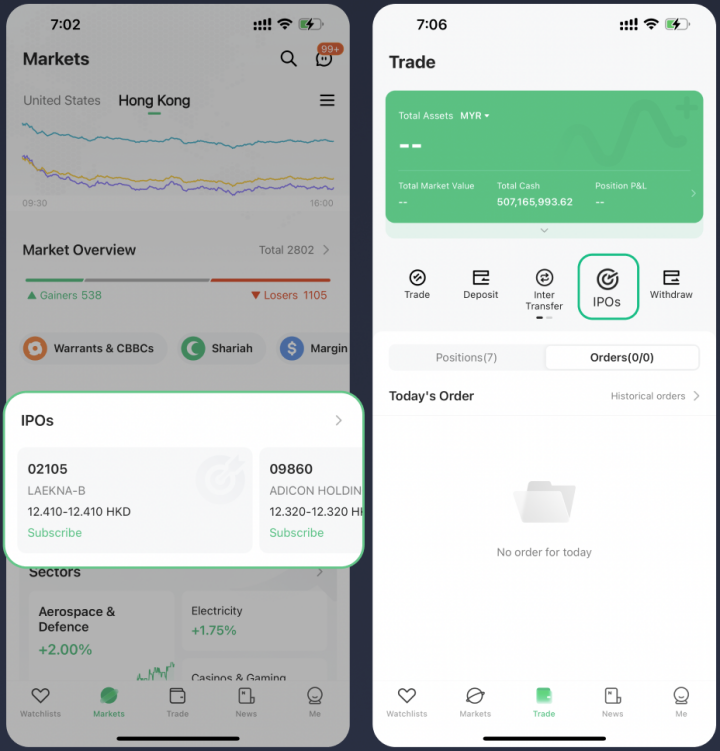
Start by navigating to the IPO area of your M+ Global app. You have two routes:
- Select 【Markets】→【Hong Kong】→【IPOs】
- Or select 【Trade】→【IPOs】
Either path takes you to the same page where all available IPO offerings are displayed.
Step 2: Choose Your IPO Stock
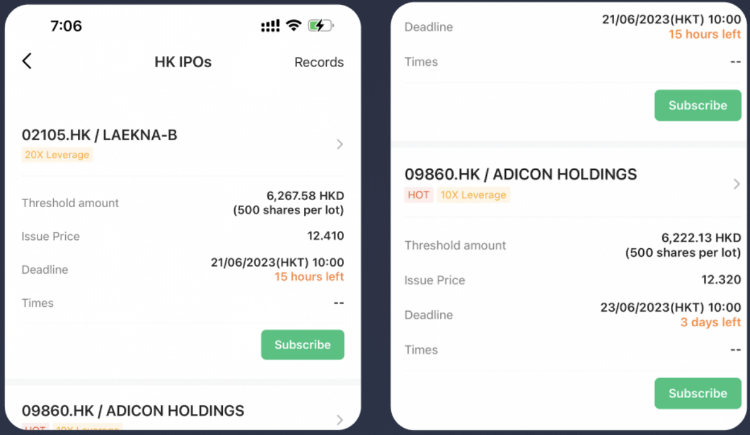
During the IPO period, stocks that are open for public subscription will appear in the 【IPOs】 section. Browse the list and select the stock that matches your investment interest.
Important deadline reminder: Each IPO stock has its own subscription deadline. Once the subscription period closes, you can no longer submit new applications for that stock. Check the deadline carefully before proceeding.
To learn more about an IPO stock before subscribing, enter its dedicated page to review the full issuance information. This helps you make an informed decision.
Step 3: Select Your Subscription Method and Submit
Choose Your Payment Method
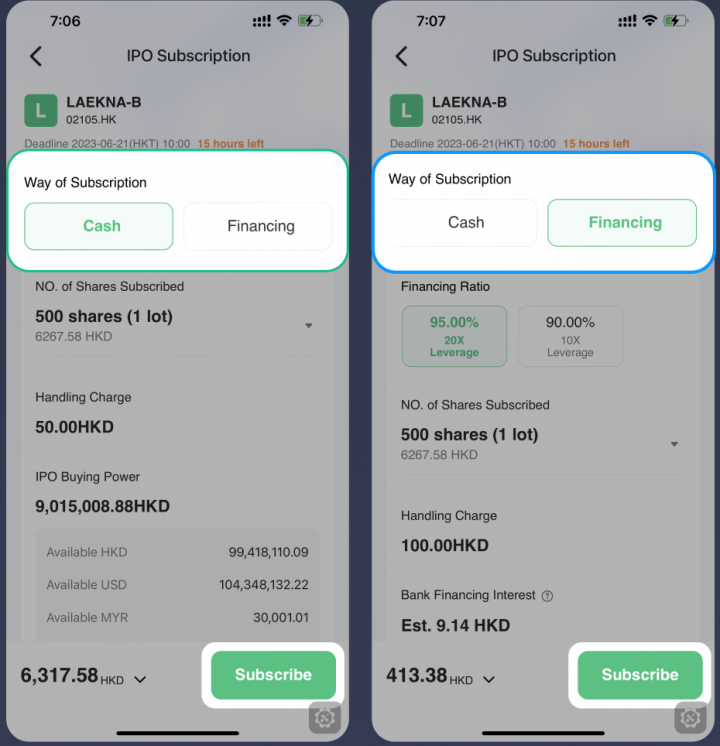
When you enter the subscription page, 【Cash】 is the default subscription method. This means you’ll fund the subscription entirely from your available balance.
If you want to use less of your own capital and subscribe for more shares, you can select 【Financing】 instead. With financing, M+ Global lends you funds for the subscription, and financing interest accrues from the subscription deadline until the day before the result announcement date. The interest is deducted on the result announcement date.
Remisier tip: The financing option is useful if you believe in the IPO but want to preserve cash for other opportunities. Just remember that interest will apply, so factor that into your cost calculation.
Enter Your Share Quantity
Specify the number of shares you wish to subscribe. The platform will show you the total cost based on your chosen method.
Review and Confirm
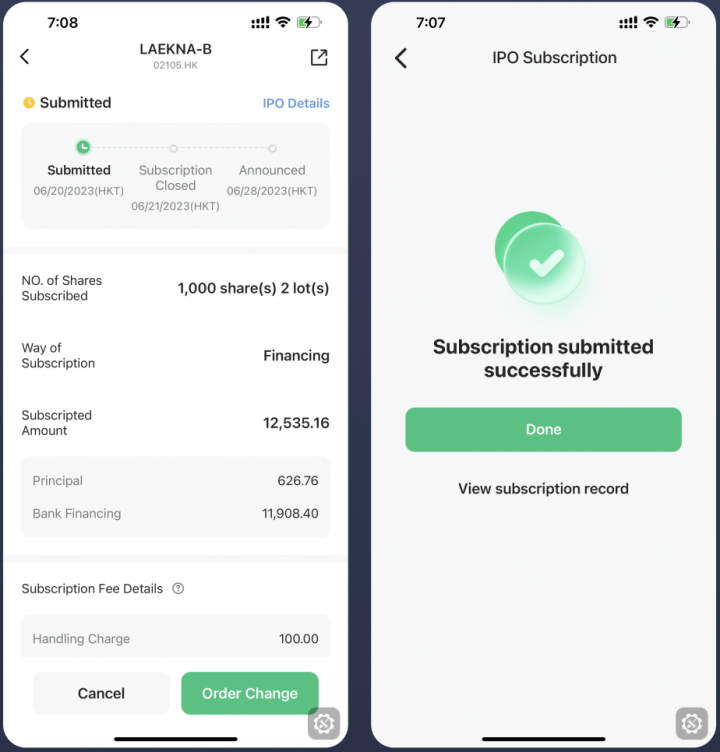
Before hitting submit, double-check your subscription method, share quantity, and all relevant details. Once you’re confident everything is correct, submit your application.
Step 4: Wait for Balloting Results
After the subscription deadline passes, M+ Global will conduct a balloting draw to allocate shares among all applicants. The result will be announced on a specified date.
On the announcement day, successfully subscribed stocks will be distributed to your account. Check platform notifications regularly for updates, or visit your account position page to see your IPO holdings directly.
Your daily statement will also display the number of shares you’ve successfully allocated through the IPO balloting.
After Allocation: Trading Your IPO Shares
IPO stocks that you’ve successfully subscribed to can be traded on the same day they are listed on the exchange. This gives you flexibility to hold for the long term or take profits immediately if market conditions are favourable.
Key Takeaways
- Access IPOs through either 【Markets】→【Hong Kong】→【IPOs】 or 【Trade】→【IPOs】
- Each IPO has a specific subscription deadline; pay close attention to avoid missing the window
- Choose between cash subscription (using your full funds) or financing subscription (using borrowed funds with interest)
- Submit your application with the desired share quantity and review all details before confirming
- Track balloting results in your account position and daily statement on the announcement date
- Successfully allocated shares can be traded immediately on the listing date
Frequently Asked Questions
What’s the difference between cash and financing subscription?
With cash subscription, you pay the full amount from your account balance. With financing subscription, M+ Global provides part of the funds, and you pay financing interest calculated from the subscription deadline to the day before the result announcement. Interest is deducted on the result announcement date. Financing is useful if you want to subscribe for more shares while preserving your cash.
Can I subscribe to an IPO after the deadline?
No. Each IPO stock has a fixed subscription deadline, after which no new applications are accepted. Once the deadline closes, you cannot subscribe to that particular IPO anymore. Always check the deadline before submitting your application.
How do I know if my IPO subscription was successful?
The balloting result is announced on a specified date. Check your account position on that date or review your daily statement to see how many shares were allocated to you. Platform notifications will also alert you to the announcement.
When can I sell my IPO shares after allocation?
IPO stocks that are successfully subscribed can be traded on the same day they are listed on the exchange. You have the flexibility to hold or sell immediately based on your investment strategy.
Where can I find more information about a specific IPO stock?
On the IPOs page, you can enter any individual IPO stock’s page to view its full issuance information. This includes details about the company, offering size, pricing, and other relevant prospectus information to help you decide whether to subscribe.
More M+ Global guides
Open your M+ Global account with Dexter Chia
Sign up in the M+ Global app with Invitation Code UBZQ to get AI automated tools, AI stock analysis and AI alerts — and a remisier you can actually reach.
WhatsApp: +60169059789 | Why choose Dexter?
Source: based on the official M+ Global Help Centre (Malacca Securities Sdn Bhd). Fees, hours and procedures are set by Malacca Securities and the exchanges and may change — check the M+ Global app or ask your remisier for the latest.
Disclaimer: This guide is for general information only and is not financial advice.