This beginner’s guide replaces our older “activate your M+ Online account” post. Since M+ Online has been retired, new and existing Malacca Securities clients use the M+ Global app for Bursa Malaysia, US and Hong Kong stocks.
1. Log in and secure your account
Download M+ Global from the Google Play Store, Apple App Store or Huawei AppGallery and log in with the details you registered with. Turn on multi-factor authentication when prompted. Never share your password or one-time codes with anyone, including people claiming to be from M+ on social media. See how to spot fake M+ pages.
2. Find your UID and account details
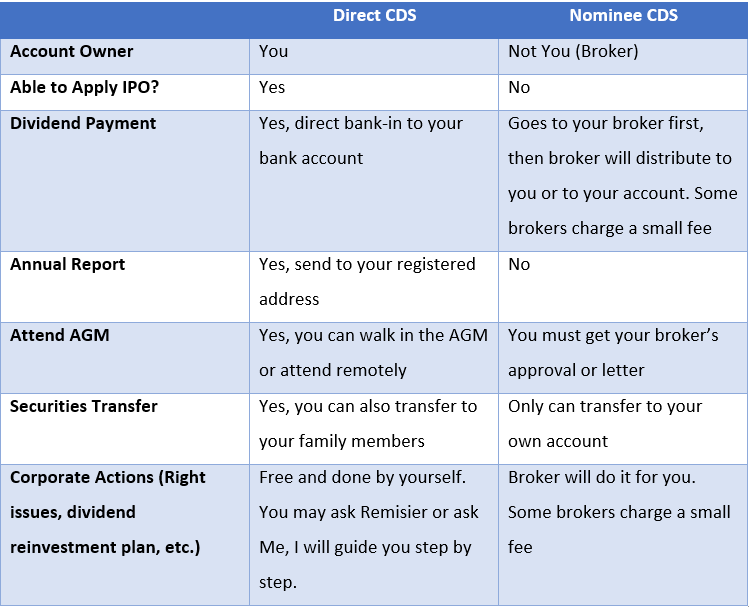
Tap Me to find your UID. You will need it if you ever contact support or change your remisier. Your CDS account number identifies where your Bursa shares are held; keep it handy for IPO applications.
3. Check your personal and bank details
Go to Me > User Profile to confirm your address, phone number, email, income range and employment status. Updates are verified by eKYC inside the app, so there is no branch visit. Make sure the bank account you will use for deposits and withdrawals is in your own name.
4. Make your first deposit
Deposit with FPX online banking from your own bank account. Start small while you learn the app. Before trading, know what each trade costs: brokerage plus the standard clearing fee (0.03%, capped at RM1,000) and stamp duty (RM1 per RM1,000, capped at RM1,000). Current M+ Global rates are in our M+ Global Review 2026.
5. Learn two order types before your first trade
- Limit order: you choose the maximum price you will pay (or the minimum you will accept when selling). Bursa shares trade in board lots of 100 shares.
- Conditional order: you set a trigger price and M+ Global sends the order automatically when the price is reached. Use it for stop-losses and take-profits.
The full step-by-step, with deposit, buy, sell and stop-loss explained, is in How to Activate, Deposit and Trade on M+ Global.
Frequently asked questions
I was an M+ Online client. Do I have to open a new account?
You need to use the M+ Global app. When registering in M+ Global, existing M+ Online clients enter their M+ Online username to link their account. Your shares stay in your CDS account.
How long does account approval take?
After you submit your application in M+ Global, it shows as “Submitted for Evaluation” until it is approved. Timing varies; your remisier can check the status for you.
Can I apply for IPOs in M+ Global?
Yes. Go to Trade > Bursa > IPO. See How to Apply for an IPO in Malaysia.
Key Takeaways
- Use M+ Global; the M+ Online app was retired on 31 October 2025.
- Turn on MFA and never share passwords or codes.
- Keep your UID and CDS number handy, and use a bank account in your own name.
- Learn limit and conditional orders before your first trade.
This guide is for education only and is not investment advice. App screens can change; ask your remisier if a step looks different.