This FAQ answers the questions former M+ Online users ask most often after moving to M+ Global. It replaces our older M+ Online FAQ.
Is the M+ Online app still available?
No. The M+ Online app was discontinued on 31 October 2025. M+ Global is now the app for all Malacca Securities clients and covers Bursa Malaysia, US and Hong Kong markets.
What happens to my shares and my account?
Your Bursa shares are held in your CDS account, not in the app, so switching apps does not move or sell them. When registering in M+ Global, existing M+ Online clients enter their M+ Online username so the app links to their account.
How do I deposit and withdraw?
Deposit with FPX online banking from a bank account in your own name. Withdrawals go to your registered bank account, and only settled cash can be withdrawn (Bursa trades settle on T+2). Step-by-step: How to Activate, Deposit and Trade on M+ Global.
Does M+ Global have stop-loss orders?
Yes, through conditional orders. You set a trigger price and M+ Global sends your buy or sell order automatically when the price is reached. Use it for stop-loss, take-profit or buying on a breakout. Note that a stop-loss can fill below your trigger if a stock gaps down.
Why is my trading limit different from my cash balance?
Your trading limit depends on your account type. A cash upfront account lets you buy only with cash deposited, while contra and margin facilities give a larger limit based on your collateral. See Types of Trading Accounts in Malaysia. If the figure still looks wrong, ask your remisier to check.
How do I update my phone number, email or address?
In M+ Global, tap Me > User Profile. Changes are verified by eKYC in the app, so there is no branch visit.
How do I transfer shares from another broker?
Use the Bursa Anywhere app’s securities transfer feature to move shares from another broker’s CDS account into your Malacca Securities CDS account. Bursa charges a transfer fee per counter. See Share Transfers with Bursa Anywhere.
How do I apply for an IPO?
Go to Trade > Bursa > IPO in M+ Global and tap Subscribe. M+ Global also offers IPO financing on selected IPOs, plus US and Hong Kong IPO subscriptions. See How to Apply for an IPO in Malaysia and the IPO financing guide.
What about rights issues, warrant conversion and odd lots?
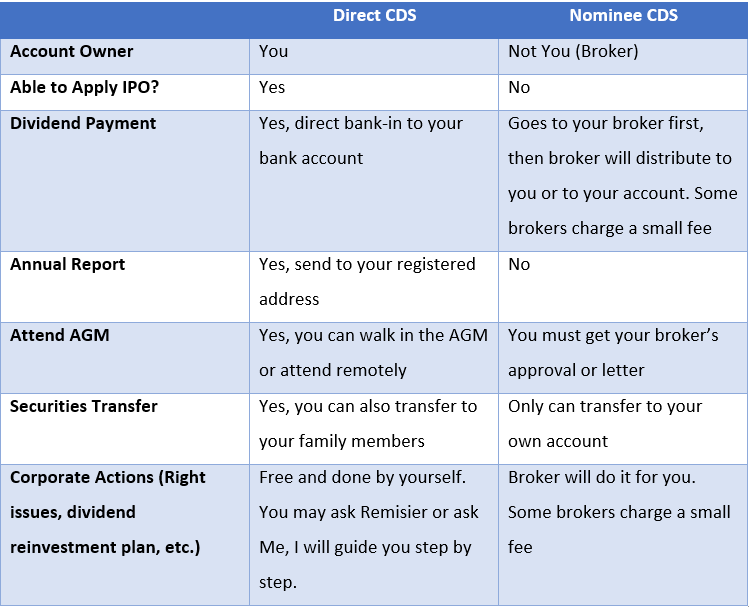
These corporate actions have deadlines and forms that vary by company. Check the company’s announcement on Bursa Malaysia and ask your remisier or M+ customer service how to act on it in your account before the deadline.
Is there a desktop version?
Yes, for Windows and macOS. See how to install M+ Global on your PC.
How do I change my remisier?
Email M+ support from your registered email with your UID (found under Me), the new remisier’s DR code and name, and your reason. Full steps and an email template: How to Change Your Remisier at M+.
What does trading on M+ Global cost?
Brokerage for Bursa starts from 0.05% with a RM8 minimum, plus the standard clearing fee and stamp duty. See the M+ Global Review 2026 for current fees, and check the official pricing page for your account type.
Key Takeaways
- M+ Online was retired on 31 October 2025; use M+ Global.
- Your shares stay in your CDS account when you switch apps.
- Stop-losses are set with conditional orders; profile updates are under Me > User Profile.
- For corporate actions with deadlines, check with your remisier early.
This FAQ is for education only and is not investment advice. App screens, fees and procedures can change; check the M+ Global app or ask your remisier.