Explore strategic insights into Arrival Price Orders, Stop Loss Orders, Stop Loss Limit Orders, Take Profit Orders, and Take Profit Limit Orders in M+ Global.
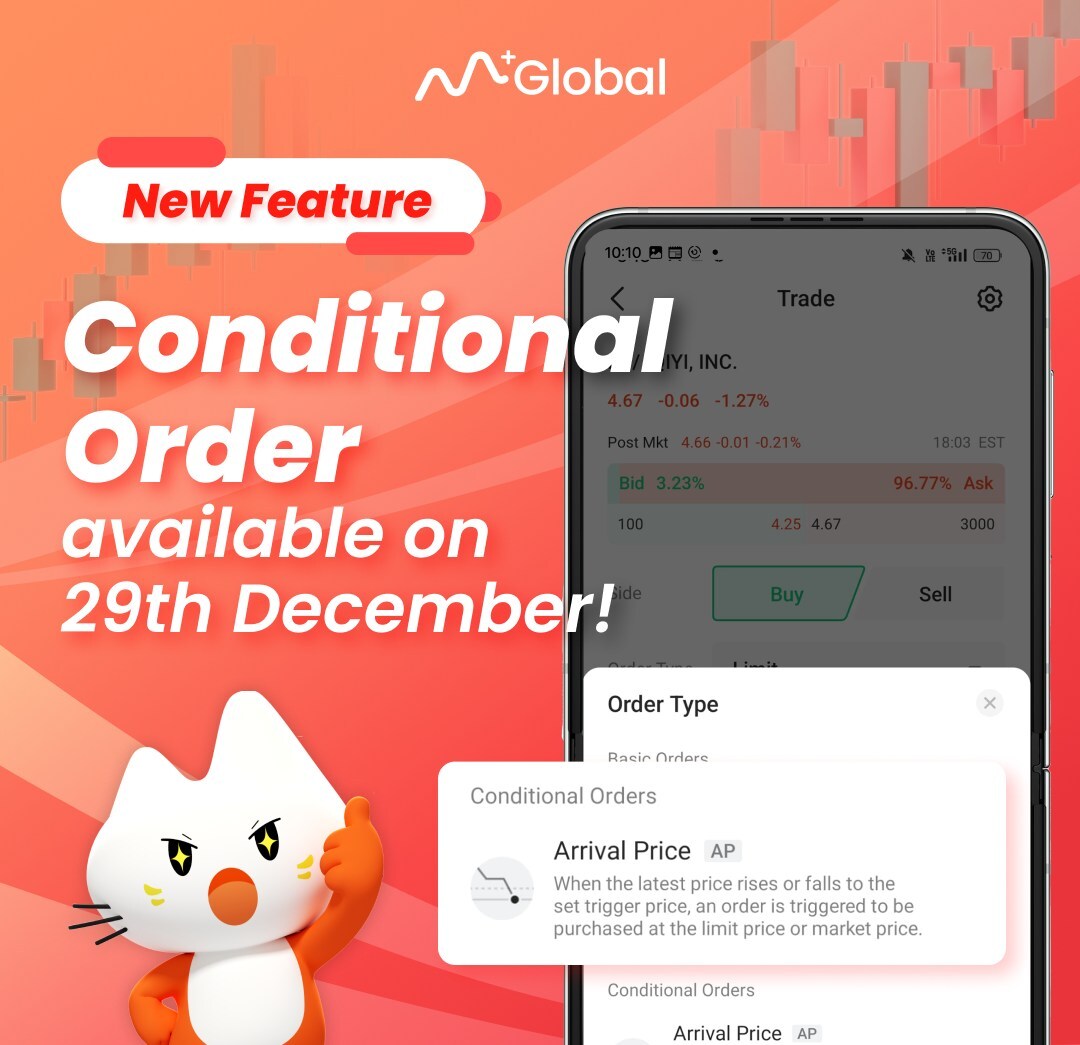 M+ Global New Feature – Conditional Order available on 29 Dec 2023. M+ Global New Feature – Conditional Order available on 29 Dec 2023. |
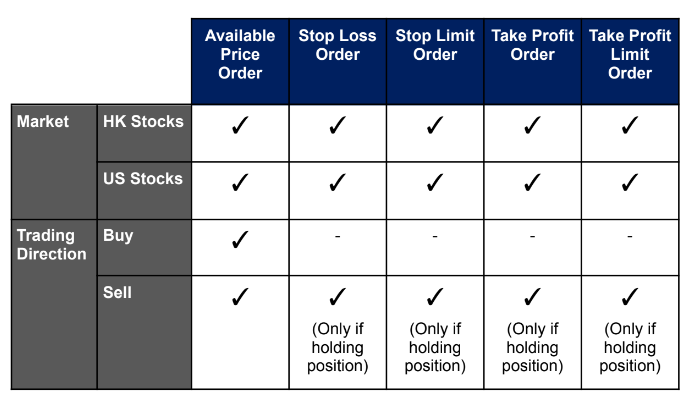 Conditional Order in M+ Global will be available on 29 Dec 2023. Conditional Order in M+ Global will be available on 29 Dec 2023. |
1. What is a Conditional Order?
The conditional order is a trading tool that allows investors to set trigger conditions for stocks in advance. During the validity period, once the stock price reaches these conditions, the system will automatically send the investor’s buy or sell orders to the exchange.
It may help investors seize opportunities during market fluctuations, while minimizing risks and losses.
2. Types of Conditional Orders
Conditional order types supported by M+ Global for trading in the US & HK Market are:
- Arrival Price Order
- Stop Loss Order
- Stop Loss Limit Order
- Take Profit Order
- Take Profit Limit Order
2.1 Arrival Price Order
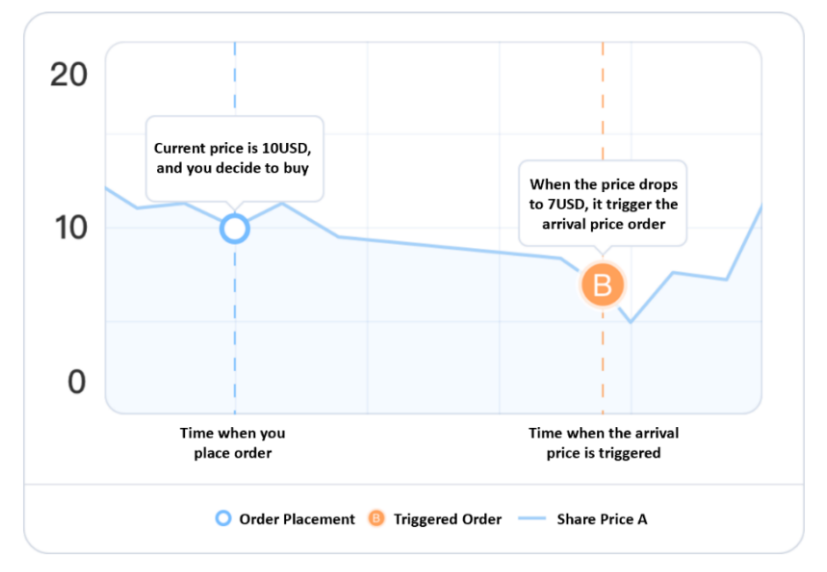
An arrival price conditional order means that the ordering system submits a buy or sell limit order / market order when the stock market price reaches the trigger price specified by the customer.
Scenario 1: You want to buy Share A and assume it will go lower than USD 10. You can set a buy price conditional order with a “Trigger Price” of USD 7 and an “Order Price” of USD 6.9.
Scenario 2: You want to buy AAPL at USD 98. If you set a normal limit order, the order is only valid for one day. If the order is not completed on the same day, it will be invalid and you will need to place a new order.
To avoid placing new orders daily, you can set a “Trigger Price” of USD 98, an “Order Price” of USD 98, and select “Good till Cancelled”. You no longer have to worry about the order expiring and placing a new order.
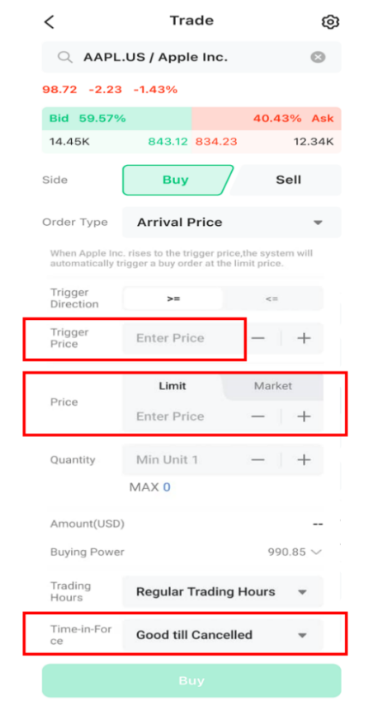 How to set Conditional Orders in M+ Global How to set Conditional Orders in M+ Global |
a) Choose the direction of the trade (buy or sell). b) Choose the direction you want to trigger. >= indicates that the buy and sell order is triggered when the current price rises to the trigger price <= indicates that the buy and sell order is triggered when the current price drops to the trigger price c) Fill in the price you want to trigger in [Trigger Price]. d) Fill in the [Order Price] for the execution of the buy and sell order after the conditional order is triggered. e) Fill in the [Order Quantity] f) Choose the trading time period. ii. If "Extended Trading Hours" is selected (US stocks only), the system will ii. ‘Good till Cancelled’: The order will be retained until cancelled or expired if the condition is not triggered (maximum 90 calendar days). h) Finally, confirm and click buy/sell. |
2.2 Stop Loss Order (System Auto Cut Loss at Market Price)
A stop loss order is a market price order submitted to sell when the market price reaches the stop loss price specified by the customer.
Scenario
You hold AAPL with a cost price of USD 100. The stock price has been falling recently. In order to avoid excessive losses caused by the stock’s sharp decline in the future, you can submit a sell stop order with a stop loss price of USD 90. If the stock price drops to USD 90 or below at this time, the system will automatically submit a market order to the exchange and the transaction will be executed at the market price (the transaction price is not
guaranteed).
** (Sell at Market Price , Order Surely Matched, Transaction Price not Guaranteed)
2.3 Stop Loss Limit Order (System Auto Cut Loss at Price that you wish to SELL)
The stop loss limit order submits a sell limit order when the market price reaches the stop loss price specified by the client.
Scenario
You hold AAPL with a cost price of USD 100. The stock price has been falling recently. In order to avoid excessive losses caused by the stock’s sharp decline in the future, you can submit a stop loss order with a stop loss price of USD 90 and a sell price of USD 89.
If the stock price drops to USD 90 or below at this time, the system will automatically submit the USD 89 limit order to the exchange, and the order may be completed at a price of USD 89 or better.
** (Sell at the Price you entered, Order is not 100% Matched)
2.4 Take Profit Order
A take profit order is a market price order submitted to sell when the market price reaches the take profit price specified by the client.
Scenario
You hold AAPL with a cost price of USD 100. The stock price has been rising recently, but there is a tendency for some correction. In order to avoid a sudden sharp drop that will cause profits to turn to losses, you can submit a sell stop order with a take profit price of USD 120. If the stock price rises to USD 120 or more at this time, the system will automatically submit a market order to the exchange and the transaction will be executed at the market price (the transaction price is not guaranteed).
** (Sell at Market Price , Order Surely Matched, Transaction Price not Guaranteed)
2.5 Take Profit Limit Order
The take profit limit order submits a sell limit order when the market price reaches the customer-specified take profit price.
Scenario
You hold AAPL with a cost price of USD 100. The stock price has been rising recently, but there is some correction trend. In order to avoid a sudden sharp drop that will cause profits to turn to losses, you can submit a take profit order with an order price of USD 119 and a limit price of USD 120. If the stock price rises to USD 119 or above at this time, the system will automatically submit the USD 120 limit order to the exchange, and the order may be executed at a price of USD 120 or better.
** (Sell at the Price you entered, Order is not 100% Matched)
Thank you for reading this post.
Accounts that registered under my Invitation Code (UBZQ) will entitle professional remisier services with FREE of charge.