In this post, we will guide you on how you can Install and Use the latest Desktop Version of M+ Global trading platform.
Follow the following steps to Download & Install M+ Global Desktop/PC Version:
Step 1: Download the below file (Windows / MacOs)
| M+ Global (MacOS Version) | |
| File Size: | 16640 kb |
| File Type: | dmg |
Download File
| M+ Global (Windows Version) | |
| File Size: | 210183 kb |
| File Type: | exe |
Download File
Step 2: Click on the icons “M+ Global (MacOS Version)” or “M+ Global (Windows Version)” to download the Installation File.
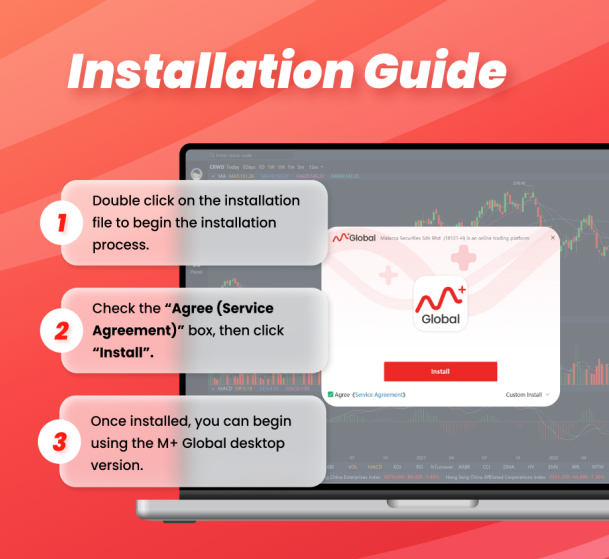
Step 3: Double click on the file.
Step 4: Read the “Agree (Service Agreement)”, then click “Install”.
Step 5: Login and start to use it!
In my next post, you can learn how to use it.