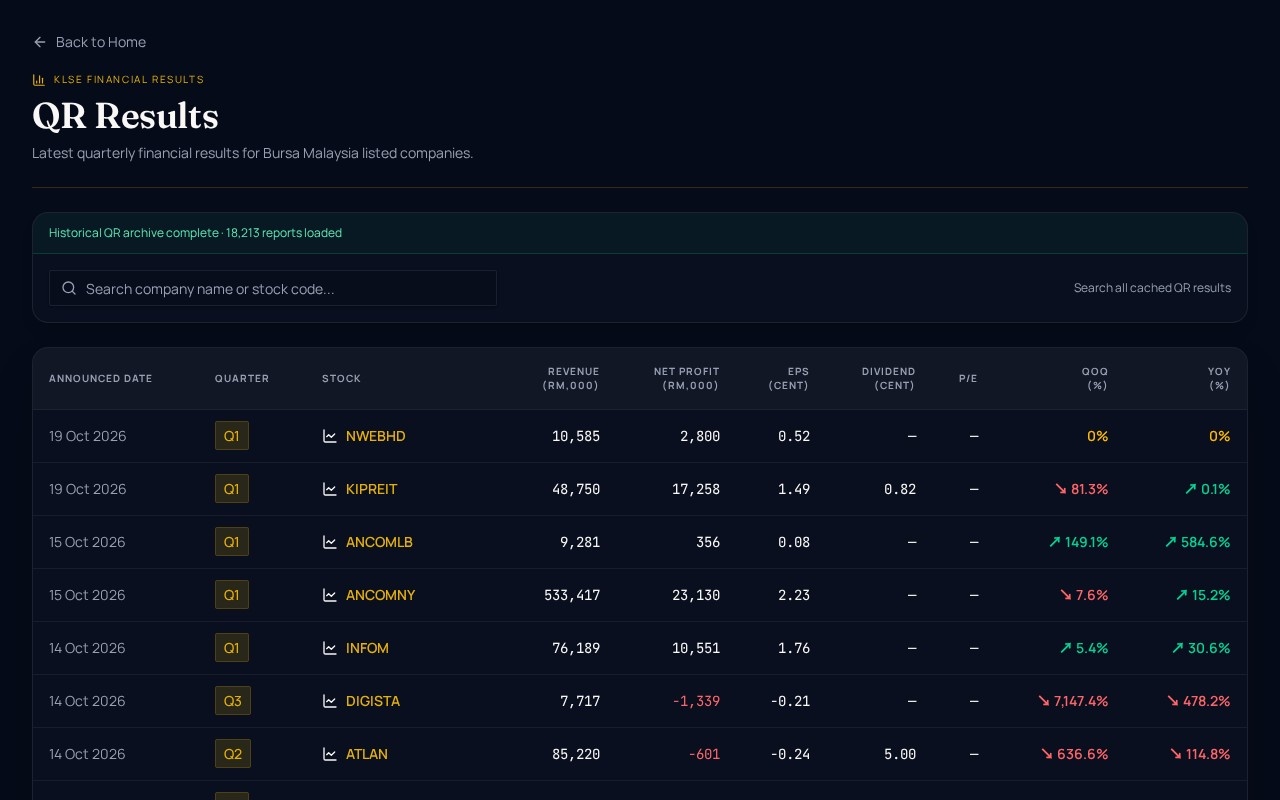
Quarterly results season on Bursa Malaysia can bring dozens of announcements in a single week. Keeping track of them in company websites or scattered news posts takes time. The KLSE Quarterly Results page puts the latest Bursa QR reports in one table, updated as each result comes out.
Read in Bahasa Malaysia · 中文
What is the KLSE Quarterly Results page?
It is a running list of Bursa Malaysia quarterly results, shown newest first. Every entry includes the date it was announced, the stock code, the quarter being reported (Q1 to Q4), and the key figures. Revenue and net profit are shown in RM’000, and EPS is shown in sen. Two growth columns, QoQ (quarter on quarter) and YoY (year on year), show how the latest figures compare with the previous quarter and with the same quarter last year.
The page is part of the AI Stock Trend Terminal, which also includes company announcements, the Malaysia IPO calendar, super investor portfolios, US results and insider trades, and this blog.
Who is this page for?
It suits anyone who follows Bursa-listed companies and wants to see results quickly without opening each filing. That includes retail investors who review their holdings each quarter, people building a watchlist, and readers who want a clear overview of how the market is reporting. Because the page is free and covers more than 18,000 reports since 2020, it is also useful for looking back at how a company’s numbers have changed over time.
How do I use the page step by step?
A simple routine works well:
- Check the announced date. Start with the newest rows to see what has come out today or this week.
- Find the stock code. If you hold or follow a company, look for its code in the Stock column.
- Read revenue and net profit. Note the scale of the business and whether it made a profit or a loss in the quarter.
- Look at EPS. EPS in sen shows earnings per share, which helps you compare profitability across companies with different share counts.
- Compare growth. Check the QoQ and YoY columns to see whether the numbers are moving up or down, and over which period.
- Dig deeper if needed. Use the Company announcements section in the terminal to look at related filings.
How do I read the numbers?
Some rows are easier to interpret than others. A company can post strong revenue growth and still record a net loss, so look at the figures together rather than one at a time. Negative net profit appears with a minus sign, and EPS below zero means a loss per share. Growth percentages can also be large when the base figure is small, so a very high percentage does not always mean a large absolute change. Some rows show 0.0% in the growth columns, which can reflect no change or a figure that was not comparable. Treat the page as a starting point for reading, not a final verdict.
Why does the speed of updates matter?
Results can move the market quickly, so seeing them as they are announced helps you stay informed. The page lists each report as it comes out, which means you do not need to wait for a weekly roundup. Checking the list regularly during results season is a practical habit for staying on top of your watchlist.
Can I also apply for IPOs from here?
The terminal includes a Malaysia IPO calendar in its menu alongside the quarterly results. If you want to apply for IPOs, you can open an M+ Global account using invitation code UBZQ. I am a licensed dealer’s representative (R336) at Malacca Securities (M+ Global), so please read the relevant offer documents and consider your own circumstances before you apply.
Frequently Asked Questions
Is the KLSE Quarterly Results page free?
Yes. The page is free to use, and it covers more than 18,000 Bursa Malaysia quarterly reports published since 2020.
What do the EPS and growth columns mean?
EPS is earnings per share, shown in sen. QoQ compares the latest quarter with the one before it, and YoY compares it with the same quarter a year earlier. Both are shown as percentages.
Can I use this page to decide whether to buy or sell a stock?
The page is designed to help you read and compare quarterly results. It does not tell you to buy, sell or subscribe to any stock or IPO. Use it alongside your own research and, if needed, advice from a qualified professional.
Ready to explore the latest Bursa results? Visit the KLSE Quarterly Results page and check today’s announcements. For more background on reading Malaysian market data, browse the Dexter Chia blog.
For information only, not a recommendation to subscribe to any IPO. IPO shares can list below their offer price.