Who This Guide Is For
You’ve just opened a Malacca Securities (M+ Global) account, you’ve logged in to place your first trade on Bursa Malaysia, and now you’re staring at two order types that sound similar but work very differently. This guide walks you through the real-world trade-offs so you don’t end up buying at a price you didn’t intend or sitting with an unfilled order all day.
What Is a Market Order?
A market order tells the exchange: "Sell this stock to me now, at whatever the best price is right now." You don’t specify a price. The system instantly matches you with the sellers offering the lowest prices (if you’re buying) or buyers offering the highest prices (if you’re selling).
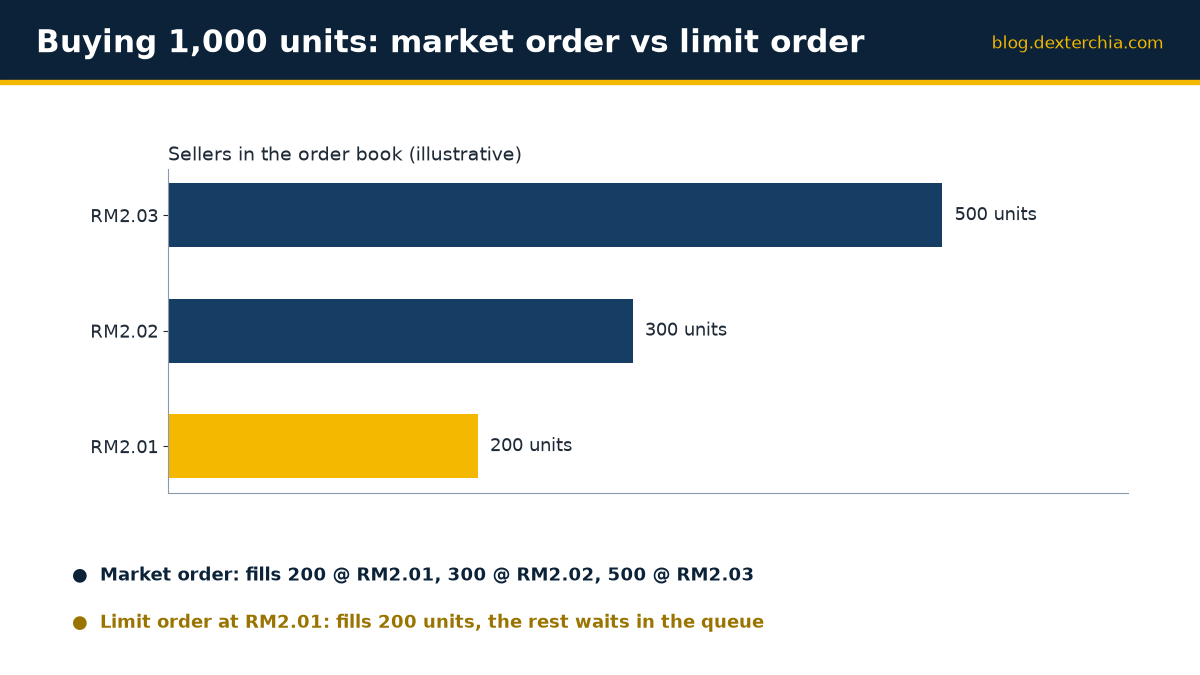
The appeal is speed and certainty of execution. You hit the button and it’s done. But the catch is slippage—the difference between the price you saw on your screen and the price you actually got.
In a stock with heavy trading volume and tight bid-ask spreads (like a major blue chip), slippage is usually a few sen or less. But in a thin stock with few buyers and sellers, a market order can execute far from where you’d hoped. I’ve seen clients buy a small-cap stock at 15 sen higher than the last trade because there was a gap in the order book.
What Is a Limit Order?
A limit order says: "I’ll buy this stock, but only if the price falls to RM1.50 or below," or "I’ll sell only if it rises to RM2.00 or higher." You set the maximum you’ll pay (on a buy) or the minimum you’ll accept (on a sell).
The benefit is price certainty. You control exactly what you’re willing to pay. The risk is that your order may not fill at all. If the stock never reaches your price, you go home empty-handed. That can be frustrating if the stock moves the other way after you’ve placed the order.
On Bursa Malaysia, if your limit order doesn’t fill during the trading session, it’s automatically cancelled at the end of the day—unless you’ve placed a Good-Till-Cancelled order. More on that later.
Tick Size and Price Limits: Where Your Limit Order Can Go
Before you even think about which order to use, you need to know where the system will allow you to place a limit order. Bursa has two constraints: tick size and price limits.
Tick size is the minimum move in price. For shares and warrants on the normal board, the tick size depends on the stock’s price. Below RM1.00, it’s 0.5 sen. From RM1.00 to RM9.99, it’s 1 sen. From RM10.00 to RM99.98, it’s 2 sen. RM100.00 and above, it’s 10 sen. This means if a stock is trading at RM2.50, you can place a limit order at RM2.51 or RM2.49—but not RM2.505. The system will reject it.
Price limits are the upper and lower boundaries the exchange sets each day. These exist to prevent wild swings. For most securities priced RM1.00 and above, the upper limit is 30% above the reference price and the lower limit is 30% below. For securities below RM1.00, it’s 30 sen in either direction. Any order priced outside these limits is rejected by the system automatically.
A practical example: a stock trading at RM10.00 has an upper limit of RM13.00 and a lower limit of RM7.00 (both rounded to the nearest tick, which is 2 sen). If you try to place a buy limit order at RM13.50, it bounces back. You must stay within RM7.00 to RM13.00.
Side-by-Side: When to Use Each Order Type
| Order Type | Speed | Price Certainty | Best For | Risk |
|---|---|---|---|---|
| Market Order | Instant | None—you get whatever price is available | Liquid blue chips, stocks with tight spreads | Slippage, especially in thin or fast markets |
| Limit Order | Delayed or never | Complete—you set the price you’ll accept | Small caps, illiquid stocks, when you want to control price | Order may not fill, leaving you out of the trade |
Market Orders: Blue Chips and the Opening Bell
Market orders work best when you’re trading highly liquid stocks. Think of the top 30 stocks on Bursa Malaysia—they have so many buyers and sellers at any given moment that the bid-ask spread is tiny (often just one tick). A market order executes in a flash with minimal slippage.
I often use market orders for my clients who want to get into or out of a blue-chip position quickly without overthinking the exact price. The time saved usually outweighs the few sen of slippage.
However, avoid market orders during the first few minutes after the opening session begins at 9:00 am, or in the seconds before the close at 12:30 pm and 4:50 pm. Prices can jump around as the market discovers the day’s sentiment. A market order placed during that chaos might execute at a very unfavourable price. If you must trade then, a limit order gives you protection.
Limit Orders: Small Caps and Thin Spreads
For illiquid or small-cap stocks, limit orders are your friend. A small cap might have a bid-ask spread of 20 sen or more. If you use a market order, you’re accepting whatever the lowest asking price is—which could be well above the last trade price. A limit order lets you place an order closer to where you think fair value is and wait for a match.
The trade-off: your order might not fill. That’s okay. You can always cancel it and try again at a higher price if the stock keeps rising without touching your limit. Or you can leave a Good-Till-Cancelled order active across multiple days if you’re patient.
One thing trips up a lot of newer investors: placing a limit order too far from the current market price and then forgetting about it. Days later, you wonder why you never bought in. Check your order periodically and adjust if the market has moved on.
Around the Open and Close
The opening and closing moments are turbulent. During the pre-opening phase (8:30 am to 9:00 am, and 2:00 pm to 2:30 pm), buyers and sellers enter orders, but nothing actually trades until the auction fires at the end. Then the opening auction price is set and continuous trading begins.
If you’re placing a limit order near these times, remember that the auction price can be very different from the previous day’s close. A limit order that seemed reasonable overnight might be far from the opening price. I advise my clients to wait a few minutes after the opening until continuous trading settles, then place limit orders if they’re targeting a specific entry price.
Similarly, during pre-closing (4:45 pm to 4:50 pm), orders can still be entered, changed or cancelled, but nothing trades until the closing auction. Avoid placing market orders in the seconds just before 4:50 pm if you’re not prepared for the closing price, which may differ sharply from the last continuous-trading price.
On M+ Global: Your Order Type Options
When you trade on Bursa Malaysia via M+ Global, the order types you can place depend on the market. For US and Hong Kong stocks, M+ Global offers limit orders, market orders, at-auction orders, and at-auction limit orders. The app also supports conditional orders (like Stop Loss and Take Profit) for US and HK stocks—those are powerful tools if you want to automate your entry or exit. You can read more in the M+ Global conditional orders guide.
For Malaysian stocks on Bursa Malaysia, the order-type list in the M+ Global app shows exactly what’s available. If you’re unsure whether trailing stops or other advanced order types are supported for a particular market, check the order-type menu in your app or reach out to ask—I’m always happy to clarify.
Common Mistakes to Avoid
Mistake 1: Using a market order in a thin stock expecting a small price move. You might intend to buy “around” RM1.50, but the market order executes at RM1.65 because there’s a gap in the order book. Use a limit order instead and be patient.
Mistake 2: Setting a limit order price outside Bursa’s daily price limits. The system rejects it silently, and you think your order is live when it isn’t. Always double-check that your limit price falls within the day’s upper and lower limits for that stock.
Mistake 3: Forgetting that single-day limit orders expire at end of day. You place a limit order at 11:00 am, then check back at 9:00 am the next day expecting it to still be active. It’s gone. If you want it to persist, specify Good-Till-Cancelled when you place it (if available for the stock you’re trading).
Mistake 4: Placing a market order seconds before the close. The closing auction price can be far from the last traded price. You might get a shock when your order fills at an unexpected level. If you must trade near the close, use a limit order with a tighter range.
Mistake 5: Ignoring tick size and rounding your limit price incorrectly. For a stock between RM1.00 and RM9.99 the tick is 1 sen, so a bid of RM2.48 is valid. For a stock at RM10.00 or above the tick is 2 sen, so RM10.15 is not a valid price; the nearest valid prices are RM10.14 and RM10.16. Check your app; it usually tells you the valid price range as you type.
Key Takeaways
- Market orders execute instantly but expose you to slippage, especially in thin stocks or during volatile periods. Use them for liquid blue chips where the spread is tight.
- Limit orders let you control your entry and exit price but carry the risk of not filling. Use them for small caps, illiquid stocks, and any time price certainty matters more than speed.
- Tick size constrains where you can place a limit order; price limits (upper and lower) cage it further. Always check that your limit price is valid before submitting.
- Avoid market orders in the opening minutes (after 9:00 am) and in the final seconds before close (around 4:50 pm). Use limit orders during these volatile windows.
- Single-day limit orders expire at close unless you specify Good-Till-Cancelled. If your order doesn’t fill today, it’s gone tomorrow unless you request otherwise.
- On M+ Global, check the order-type menu in your app to confirm which order types are available for the stock or market you’re trading, and reach out if you’re unsure.
Frequently Asked Questions
What’s the difference between slippage and a bad execution?
Slippage is the normal difference between the price you see on screen and the price your market order actually executes at—it’s built into how markets work. A bad execution is when your broker fails to get you the best available price or charges excessive fees. Malacca Securities executes your order on Bursa Malaysia’s system directly; slippage is determined by market depth, not by us.
Can I cancel a limit order after I’ve placed it?
Yes. During trading hours, you can cancel any unmatched order. Log into M+ Global, find the order, and hit cancel. Once it’s filled (even partially), you can’t cancel the filled portion, but any unfilled remainder can be cancelled. Note that during pre-opening and pre-closing phases, orders can be changed or cancelled, but nothing is matched until the auction.
If my limit order doesn’t fill, do I have to pay a fee?
No. Brokerage and other charges apply only to executed trades. An unfilled order costs you nothing. However, if you place many orders that never fill, you’re tying up capital (mentally, at least) that could be deployed elsewhere, so it’s worth reviewing your strategy periodically.
Can I use a limit order to sell a stock I don’t yet own (shorting)?
Bursa Malaysia allows short selling only for securities on the specific short-selling list, and only through authorised brokers. Reach out to me to check if your target stock is eligible and whether Malacca Securities participates in short selling for that stock.
What if the stock gaps past my limit price overnight?
If a stock rises sharply overnight or at the open, and your buy limit order is now well below the market, your order simply won’t fill. The market has moved beyond your price. You can cancel it and place a new limit order at a higher level if you still want in, or use a market order to chase it. There’s no penalty, but you do miss the move.
Next Steps
The best way to learn is to place a few real trades and see how each order type behaves. Start with a blue chip using a market order, then try a limit order on a less liquid stock. You’ll quickly develop a feel for when each one makes sense.
If you’d like to discuss your specific trading plan or need help placing your first order, I’m here to help. Reach out via WhatsApp at +60169059789 or use the M+ Global app to message me directly. If you’re not yet a Malacca Securities client, you can open an account using my invitation code UBZQ.
Happy trading, and I look forward to supporting your journey on Bursa Malaysia.
Need Help With This?
If you are an M+ Global client and need help with this process, message me directly — I handle these requests for clients every week.
WhatsApp: +60169059789 | M+ Global Invitation Code: UBZQ
Disclaimer: This article is for informational purposes only and does not constitute financial advice. Always do your own research before making investment decisions.
Want to invest in Bursa Malaysia or US markets? Contact Dexter Chia, an AI Driven Remisier who has 2,200+ clients at Malacca Securities Sdn Bhd (M+ Global). M+ Global Invitation Code: UBZQ | WhatsApp: +60169059789 | Why Choose Dexter?